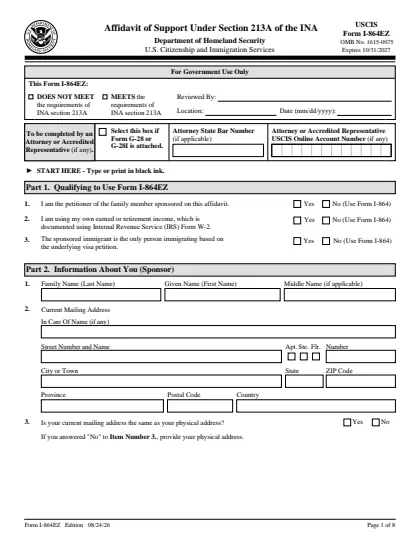
Page 1 26 fields
To be completed by an attorney or accredited representative (if any). Select this box if Form G- 28 or Form G- 28 I is attached. To be completed by an attorney or accredited representative (if any). Enter Attorney or State Bar Number (if applicable). To be completed by an attorney or accredited representative (if any). Enter Attorney or Accredited Representative Number U S C I S Online Number (if any). 12 characters. Part 1. Qualifying to Use Form I - 8 64 E Z. 1. I am the petitioner of the family member sponsored on this affidavit. Select No. Part 1. Qualifying to Use Form I - 8 64 E Z. 1. I am the petitioner of the family member sponsored on this affidavit. Select Yes. Part 1. Qualifying to Use Form I - 8 64 E Z. 3. I am using my own earned or retirement income, which is documented using Internal Revenue Service ( IR S) Form W-2. Select No (Use Form I - 8 64). Part 1. Qualifying to Use Form I - 8 64 E Z. 2. I am using my own earned or retirement income, which is documented using Internal Revenue Service (I R S) Form W - 2. Select Yes. Part 1. Qualifying to Use Form I - 8 64 E Z. 3. The sponsored immigrant is the only person immigrating based on the underlying visa petition. Select No (Use Form I - 8 64). Part 1. Qualifying to Use Form I - 8 64 E Z. 3.. The sponsored immigrant is the only person immigrating based on the underlying visa petition. Select Yes. Part 2. Information About You (Sponsor). 1. Enter Family Name, Last Name. Part 2. Information About You (Sponsor) . Enter Given Name, First Name. Part 2. Information About You (Sponsor). 1. Enter Middle Name, if applicable. Part 1. Information About You (the Household Member). Mailing Address. 3. Is your current mailing address the same as your physical address? Select No. If you answered "No" to Item Number 3., provide your physical addres Part 1. Information About You (the Household Member). Mailing Address. 3. Is your current mailing address the same as your physical address? Select Yes. Part 2. Information About You (Sponsor). 2. Current Mailing Address. Enter In Care of Name if any. Part 1. Information About You (To be completed by the person requesting a Part 2. Information About You (Sponsor). 2. Current Mailing Address. Enter Street Number and Name. Part 2. Information About You (Sponsor). 2. Current Mailing Address. Select Apartment. Part 2. Information About You (Sponsor). 2. Current Mailing Address. 2. Current Physical Address. Select Suite. Part 2. Information About You (Sponsor). 2. Current Mailing Address. 2. Physical Address. Select Floor. Part 2. Information About You (Sponsor). 2. Current Mailing Address. Enter Apartment, Suite or Floor Number. Part 2. Information About You (Sponsor). 2. Current Mailing Address. Enter City or Town. Part 2. Information About You (Sponsor). 2. Current Mailing Address. Select State from List of States. AA AE AK AL AP AR AS AZ CA CO CT DC DE FL FM GA GU HI IA ID IL IN KS KY LA MA MD ME MH MI MN MO MP MS MT NC ND NE NH NJ NM NV NY OH OK OR PA PR PW RI SC SD TN TX UT VA VI VT WA WI WV WY Part 2. Information About You (Sponsor). 2. Current Mailing Address. Enter ZIP Code. Part 2. Information About You (Sponsor). 2. Current Mailing Address. Enter Province. Part 2. Information About You (Sponsor). 2. Current Mailing Address. Enter Postal Code. Part 2. Information About You (Sponsor). 2. Current Mailing Address. Enter Country.
Page 2 26 fields
Part 2. Information About You (Sponsor). Other Information. 5. Enter Country of Birth. Part 2. Information About You (Sponsor). Other Information. 6. Enter Date of Birth. Enter as 2 digit month, 2 digit day and 4 digit year. Part 2. Information About You (Sponsor). Other Information. 7. Enter Country of Birth. Part 2. Information About You (Sponsor). Other Information. 8. Enter U.S. Social Security Number, required. 9 digits. Part 2. Information About You (Sponsor). Other Information. 9. Immigration Status. Select I am a U.S. citizen. Part 2. Information About You (Sponsor). Other Information. 9. Immigration Status. Select I am a lawful permanent resident. Part 2. Information About You (Sponsor). Other Information. 9. Immigration Status. Select I am a U.S. national. Part 1. Information About You (To be completed by the person requesting a medical examination, NOT the civil surgeon). 3. Other Information. E. Part 2. Information About You (Sponsor). Other Information. 10. Enter Sponso Part 2. Information About You (Sponsor). Other Information. 11. Enter U S C I S Online Account Number, if any. Part 2. Information About You (Sponsor). Military Service. 12. I am currently on active duty in the United States Armed Forces or U.S. Coast Guard. Select Yes. Part 2. Information About You (Sponsor). Military Service. 12. I am currently on active duty in the United States Armed Forces or U.S. Coast Guard. Select No. Part 3. Information About the Immigrant You Are Sponsoring (Intending Immigrant). 1. Name of Immigrant. Enter Family Name (Last Name). Part 3. Information About the Immigrant You Are Sponsoring (Intending Immigrant). 1. Name of Immigrant. Enter Given Name (First Name). Part 3. Information About the Immigrant You Are Sponsoring (Intending Immigrant). 1. Name of Immigrant. Enter Middle Name (if applicable). Part 3. Information About the Immigrant You Are Sponsoring (Intending Immigrant). 2. Current Mailing Address. In Care of Name if any. Part 3. Information About the Immigrant You Are Sponsoring (Intending Immigrant). 2. Current Mailing Address. Enter Street Number and Name. Part 3. Information About the Immigrant You Are Sponsoring (Intending Immigrant). 2. Current Mailing Address.Select Apartment. Part 3. Information About the Immigrant You Are Sponsoring (Intending Immigrant). 2. Current Mailing Address. Select Suite. Part 1. Information About You (To be completed by the person requesting a medical examination, NOT the civil Part 3. Information About the Immigrant You Are Sponsoring (Intending Immigrant). 2. Current Mailing Address. S Part 3. Information About the Immigrant You Are Sponsoring (Intending Immigrant). 2. Current Mailing Address. Enter Apartment, Suite or Floor Number. Part 3. Information About the Immigrant You Are Sponsoring (Intending Immigrant). 2. Current Mailing Address. Enter City or Town. Part 3. Information About the Immigrant You Are Sponsoring (Intending Immigrant). 2. Current Mailing Address. Select State from List of States. AA AE AK AL AP AR AS AZ CA CO CT DC DE FL FM GA GU HI IA ID IL IN KS KY LA MA MD ME MH MI MN MO MP MS MT NC ND NE NH NJ NM NV NY OH OK OR PA PR PW RI SC SD TN TX UT VA VI VT WA WI WV WY Part 3. Information About the Immigrant You Are Sponsoring (Intending Immigrant). 2. Current Mailing Address. Enter ZIP Code. Part 3. Information About the Immigrant You Are Sponsoring (Intending Immigrant). 2. Current Mailing Address. Enter Province. Part 3. Information About the Immigrant You Are Sponsoring (Intending Immigrant). 2. Current Mailing Address. Enter Postal Code. Part 3. Information About the Immigrant You Are Sponsoring (Intending Immigrant). 2. Current Mailing Address. Enter Country.
Page 3 20 fields
Part 3. Information About the Immigrant You Are Sponsoring (Intending Immigrant). Other Information. 3. Enter Country of Citizenship or Nationality. Part 3. Information About the Immigrant You Are Sponsoring (Intending Immigrant). Other Information. 4. Enter Date of Birth. Enter as 2 digit month, 2 digit day and 4 digit year. Part 3. Information About the Immigrant You Are Sponsoring (Intending Immigrant). Other Information. 5. Enter Alien Registration Number (A. Number), if any. Part 3. Information About the Immigrant You Are Sponsoring (Intending Immigrant). Other Information. 6. Enter U S C I S Online Account Number, if any. Part 3. Information About the Immigrant You Are Sponsoring (Intending Immigrant). Other Information. 7. Enter Interpreter's Daytime Telephone Number. Enter 10 digit number. Part 4. Information About Your Household Size. 2. Enter Your Spouse. Part 4. Information About Your Household Size. 3. Enter Your dependent children under 21 years of age. Part 4. Information About Your Household Size. 5. If you have sponsored any other persons on a Form I - 8 64 who are now lawful permanent residents in the United States, enter the number here. Part 4. Information About Your Household Size. 5. If you have any other dependents listed on your most recent Federal income tax return, enter the number here. Part 5. Information About Your Employment and Income. 1. I am currently. Select Employed (Complete Item Number 2.) Part 5. Information About Your Employment and Income. 1. I am currently. Select Retired (Complete Item Number 3.) Part 5. Information About Your Employment and Income. 4. Enter your current individual annual income. Part 5. Information About Your Employment and Income. Federal Income Tax Information. 5. Have you filed a Federal income tax return for each of the three most recent tax years? Select Yes. Part 5. Information About Your Employment and Income. Federal Income Tax Information. 5. Have you filed a Federal income tax return for each of the three most recent tax years? Select No. Part 5. Information About Your Employment and Income. Federal Income Tax Information. My total income (adjusted gross income on IRS Form 1040EZ) as reported on my Federal income tax returns for the most recent three year Part 5. Information About Your Employment and Income. Federal Income Tax Information. My total income (adjusted gross income on IRS Form 1040EZ) as reported on my Federal income tax returns for the mo (2) Part 5. Information About Your Employment and Income. Federal Income Tax Information. My total income (adjusted gross income on IRS Form 1040EZ) as reported on my Federal income tax returns for the mo (3) Part 5. Information About Your Employment and Income. Federal Income Tax Information. My total income (adjusted gross income on IRS Form 1040EZ) as reported on my Federal income tax returns for the mo (4) Part 5. Information About Your Employment and Income. Federal Income Tax Information. My total income (adjusted gross income on IRS Form 1040EZ) as reported on my Federal income tax returns for the mo (5) Part 5. Information About Your Employment and Income. Federal Income Tax Information. My total income (adjusted gross income on IRS Form 1040EZ) as reported on my Federal income tax returns for the mo (6)
Page 5 6 fields
Part 6. Sponsor's Contract, Statement, Contact Information, Declaration, Certification, and Signature. Sponsor's Statement. NOTE: Select the box for either Item Number 1. A. or 1. B. If applicable, select the box for Ite Part 6. Sponsor's Contract, Statement, Contact Information, Declaration, Certification, and Signature. Sponsor's Statement. 1. B. Select The interpreter named in Part 7. read to me every question and instruction on this Part 6. Sponsor's Contract, Statement, Contact Information, Declaration, Certification, and Signature. Sponsor's Statement. 2. Select At my request, the preparer named in Part 8., prepared this affidavit for me based onl Part 6. Sponsor's Contract, Statement, Contact Information, Declaration, Certification, and Signature. Sponsor's Contact Information. 3. Enter Sponsor's Daytime Telephone Number. Enter 10 digit number Part 6. Sponsor's Contract, Statement, Contact Information, Declaration, Certification, and Signature. Sponsor's Contact Information. 4. Enter Sponsor's Mobile Telephone Number, if any. Enter 10 digit number. Part 6. Sponsor's Contract, Statement, Contact Information, Declaration, Certification, and Signature. Sponsor's Contact Information. 5. Enter Sponsor's Email Address, if any.
Page 6 1 field
Part 6. Sponsor's Contract, Statement, Contact Information, Declaration, Certification, and Signature. 6. Sponsor's Signature. Enter Date of Signature. Enter as 2-digit Month, 2-digit Day, and 4-digit Year.
Page 7 14 fields
Part 8. Contact Information, Declaration, and Signature of the Person Preparing this Affidavit, if Other Than the Sponsor. Preparer's Full Name. 1. Enter Preparer's Family Name (Last Name). Part 8. Contact Information, Declaration, and Signature of the Person Preparing this Affidavit, if Other Than the Sponsor. Preparer's Full Name. 1. Enter Preparer's Given Name (First Name). Part 8. Contact Information, Declaration, and Signature of the Person Preparing this Affidavit, if Other Than the Sponsor. Preparer's Full Name. 2. Enter Preparer's Business or Organization Name (if any). Part 8. Contact Information, Declaration, and Signature of the Person Preparing this Affidavit, if Other Than the Sponsor. Preparer's Contact Information. 2. Enter Preparer's Daytime Telephone Number. Part 8. Contact Information, Declaration, and Signature of the Person Preparing this Affidavit, if Other Than the Sponsor. Preparer's Contact Information. 4. Enter Preparer's Mobile Telephone Number (if any). Part 8. Contact Information, Declaration, and Signature of the Person Preparing this Affidavit, if Other Than the Sponsor. Preparer's Contact Information. 5. Enter Preparer's Email Address (if any). Part 8. Contact Information, Declaration, and Signature of the Person Preparing this Affidavit, if Other Than the Sponsor. Preparer's Certification and Signature. 6. Preparer's Signature. Enter Date of Signature. Enter a Interpreter's Family Name (Last Name) Part 7. Interpreter's Contact Information, Certification, and Signature. Interpreter's Full Name. Enter Interpreter's Given Name (First Name). Part 7. Interpreter's Contact Information, Certification, and Signature. Interpreter's Contact Information. 3. Enter Interpreter's Daytime Telephone Number. Part 7. Interpreter's Contact Information, Certification, and Signature. Interpreter's Contact Information. 4. Interpreter's Mobile Telephone Number (if any). Part 7. Interpreter's Contact Information, Certification, and Signature. Interpreter's Contact Information. 5. Interpreter's Email Address (if any). Part 7. Interpreter's Contact Information, Certification, and Signature. Interpreter's Certification. I certify, under penalty of perjury, that: that I am fluent in English and I have interpreted every question on the co Part 7. Interpreter's Contact Information, Certification, and Signature. Interpreter's Signature. 6. Interpreter's Signature.Enter Date of Signature. Enter as 2-digit Month, 2-digit Day, and 4-digit Year.
Page 8 16 fields
Part 9. Additional Information. 3. Enter Page Number. Part 9. Additional Information. 3. Enter Part Number. Part 9. Additional Information. 3. Enter Item Number. Part 11. Additional Information. 5. D. Enter Additional Information. Part 9. Additional Information. 4. Enter Page Number. Part 9. Additional Information. 4. Enter Part Number. Part 9. Additional Information. 4. Enter Item Number. Part 11. Additional Information. 5. D. Enter Additional Information. (2) Part 9. Additional Information. 5. Enter Page Number. Part 9. Additional Information. 5. Enter Part Number. Part 9. Additional Information. 5. Enter Item Number. Part 9. Additional Information. 5. Enter Additional Information. Part 9. Additional Information. 6. Enter Page Number. Part 9. Additional Information. 6. Enter Part Number. Part 9. Additional Information. 6. Enter Item Number. Part 9. Additional Information. 6. Enter Additional Information.