Page 1 43 fields
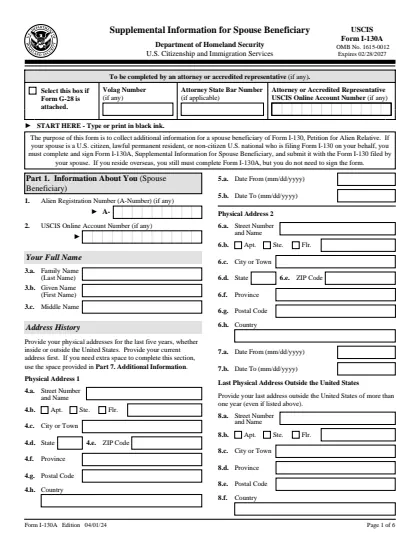
Part 1. Information About You (Spouse Beneficiary). 1. Enter Alien Registration Number. (A. Number) (if any). Part 1. Information About You (Spouse Beneficiary). Address History. Provide your physical addresses for the last five years, whether inside or outside the United States. Provide your current address first. If you need e Part 1. Information About You (Spouse Beneficiary). Address History. Physical Address 1. 4. B. Select this Box for Apartment. Part 1. Information About You (Spouse Beneficiary). Address History. Physical Address 1. 4. B. Select this Box for Suite. Part 1. Information About You (Spouse Beneficiary). Address History. Physical Address 1. 4. B. Select this Box for Floor. Part 1. Information About You (Spouse Beneficiary). Address History. Physical Address 1. 4. B. Enter Apartment, Suite or Floor Number. Part 1. Information About You (Spouse Beneficiary). Address History. Physical Address 1. 4. C. Enter City or Town. Part 1. Information About You (Spouse Beneficiary). Address History. Physical Address 1. 4. D. Select State from List of States. AA AE AK AL AP AR AS AZ CA CO CT DC DE FL FM GA GU HI IA ID IL IN KS KY LA MA MD ME MH MI MN MO MP MS MT NC ND NE NH NJ NM NV NY OH OK OR PA PR PW RI SC SD TN TX UT VA VI VT WA WI WV WY Part 1. Information About You (Spouse Beneficiary). Address History. Physical Address 1. 4. E. Enter Zip Code. Part 1. Information About You (Spouse Beneficiary). Address History. Physical Address 1. 4. F. Enter Province. Part 1. Information About You (Spouse Beneficiary). Address History. Physical Address 1. 4. H. Enter Country. Part 1. Information About You (Spouse Beneficiary). Address History. Physical Address 1. 4. G. Enter Postal Code. Part 1. Information About You (Spouse Beneficiary). Address History. Physical Address 2. 6. A. Enter Street Number and Name. Part 1. Information About You (Spouse Beneficiary). Address History. Physical Address 2. 6. B. Select this Box for Apartment. Part 1. Information About You (Spouse Beneficiary). Address History. Physical Address 2. 6. B. Select this Box for Suite. Part 1. Information About You (Spouse Beneficiary). Address History. Physical Address 2. 6. B. Select this Box for Floor. Part 1. Information About You (Spouse Beneficiary). Address History. Physical Address 2. 6. B. Enter Apartment, Suite or Floor Number. Part 1. Information About You (Spouse Beneficiary). Address History. Physical Address 2. 6. C. Enter City or Town. Part 1. Information About You (Spouse Beneficiary). Address History. Physical Address 2. 6. D. Select State from List of States. AA AE AK AL AP AR AS AZ CA CO CT DC DE FL FM GA GU HI IA ID IL IN KS KY LA MA MD ME MH MI MN MO MP MS MT NC ND NE NH NJ NM NV NY OH OK OR PA PR PW RI SC SD TN TX UT VA VI VT WA WI WV WY Part 1. Information About You (Spouse Beneficiary). Address History. Physical Address 2. 6. E. Enter Zip Code. Part 1. Information About You (Spouse Beneficiary). Address History. Physical Address 2. 6. F. Enter Province. Part 1. Information About You (Spouse Beneficiary). Address History. Physical Address 2. 6. H. Enter Country. Part 1. Information About You (Spouse Beneficiary). Address History. Physical Address 2. 6. G. Enter Postal Code. To be completed by an attorney or accredited representative (if any). Select this box if Form G - 28 is attached. To be completed by an attorney or accredited representative (if any). Enter Attorney State Bar Number, if applicable. To be completed by an attorney or accredited representative (if any). Enter Attorney or Accredited Representative U S C I S Online Account Number (if any). Part 1. Information About You (Spouse Beneficiary). Address History. Physical Address 2. 7. A. Enter Date From. Enter as 2-digit Month, 2-digit Day and 4-digit Year. Part 1. Information About You (Spouse Beneficiary). Address History. Physical Address 2. 7. B. Enter Date To. Enter as 2-digit Month, 2-digit Day and 4-digit Year. Part 1. Information About You (Spouse Beneficiary). Your Full Name. 3. A. Enter Family Name (Last Name). Part 1. Information About You (Spouse Beneficiary). Your Full Name. 3. B. Enter Given Name (First Name). Part 1. Information About You (Spouse Beneficiary). Your Full Name. 3. C. Enter Middle Name. Part 1. Information About You (Spouse Beneficiary). 2. Enter U S C I S Online Account Number (if any). Part 1. Information About You (Spouse Beneficiary). Address History. Physical Address 1. 5. A. Enter Date From. Enter as 2-digit Month, 2-digit Day and 4-digit Year. Part 1. Information About You (Spouse Beneficiary). Address History. Last Physical Address Outside the United States. 8. E. Enter Postal Code. Part 1. Information About You (Spouse Beneficiary). Address History. Last Physical Address Outside the United States. 8. F. Enter Country. Part 1. Information About You (Spouse Beneficiary). Address History. Last Physical Address Outside the United States. 8. D. Enter Province. Part 1. Information About You (Spouse Beneficiary). Address History. Last Physical Address Outside the United States. 8. C. Enter City or Town. Part 1. Information About You (Spouse Beneficiary). Address History. Last Physical Address Outside the United States. 8. B. Enter Apartment, Suite or Floor Number. Part 1. Information About You (Spouse Beneficiary). Address History. Last Physical Address Outside the United States. 8. B. Select this Box for Apartment. Part 1. Information About You (Spouse Beneficiary). Address History. Last Physical Address Outside the United States. 8. B. Select this Box for Suite. Part 1. Information About You (Spouse Beneficiary). Address History. Last Physical Address Outside the United States. 8. B. Select this Box for Floor. Part 1. Information About You (Spouse Beneficiary). Address History. Last Physical Address Outside the United States. Provide your last address outside the United States of more than one year (even if listed above). 8. A To be completed by an attorney or accredited representative (if any). Enter Volag Number (if any).
Page 2 48 fields
Part 1. Information About You (Spouse Beneficiary). Address History. Last Physical Address Outside the United States. 9. B. Enter Date To. Enter as 2-digit Month, 2-digit Day and 4-digit Year. Part 1. Information About You (Spouse Beneficiary). Address History. Last Physical Address Outside the United States. 9. A. Enter Date From. Enter as 2-digit Month, 2-digit Day and 4-digit Year. Part 1. Information About You (Spouse Beneficiary). Information About Parent 1. Full Name of Parent 1. 10. B. Enter Given Name (First Name). Part 1. Information About You (Spouse Beneficiary). Information About Parent 1. Full Name of Parent 1. 10. C. Enter Middle Name. Part 1. Information About You (Spouse Beneficiary). Information About Parent 1. 13. Enter City / Town / Village of Birth. Part 1. Information About You (Spouse Beneficiary). Information About Parent 1. 15. Enter City / Town / Village of Residence. Part 1. Information About You (Spouse Beneficiary). Information About Parent 1. 16. Enter Country of Residence. Part 1. Information About You (Spouse Beneficiary). Information About Parent 1. 14. Enter Country of Birth. Part 1. Information About You (Spouse Beneficiary). Information About Parent 1. 11. Enter Date of Birth. Enter as 2-digit Month, 2-digit Day and 4-digit Year. Part 1. Information About You (Spouse Beneficiary). Information About Parent 1. Full Name of Parent 1. 10. A. Enter Family Name (Maiden Name). Part 2. Information About Your Employment. Employment History. Employer 1. 2. A. Enter Street Number and Name. Part 2. Information About Your Employment. Employment History. Employer 1. 2. B. Select this Box for Apartment. Part 2. Information About Your Employment. Employment History. Employer 1. 2. B. Select this Box for Suite. Part 2. Information About Your Employment. Employment History. Employer 1. 2. B. Select this Box for Floor. Part 2. Information About Your Employment. Employment History. Employer 1. 2. B. Enter Apartment, Suite or Floor Number. Part 2. Information About Your Employment. Employment History. Employer 1. 2. C. Enter City or Town. Part 2. Information About Your Employment. Employment History. Employer 1. 2. F. Enter Province. Part 2. Information About Your Employment. Employment History. Employer 1. 2. G. Enter Postal Code. Part 2. Information About Your Employment. Employment History. Employer 1. 2. E. Enter Zip Code. Part 2. Information About Your Employment. Employment History. Employer 1. 2. D. Select State from List of States. AA AE AK AL AP AR AS AZ CA CO CT DC DE FL FM GA GU HI IA ID IL IN KS KY LA MA MD ME MH MI MN MO MP MS MT NC ND NE NH NJ NM NV NY OH OK OR PA PR PW RI SC SD TN TX UT UT VA VI VT WA WI WV WY Part 2. Information About Your Employment. Employment History. Employer 1. 2. H. Enter Country. Part 2. Information About Your Employment. Provide your employment history for the last five years, whether inside or outside the United States. Provide your current employment first. If you are currently unemployed, typ Part 1. Information About You (Spouse Beneficiary). Information About Parent 2. 18. Enter Date of Birth. Enter as 2-digit Month, 2-digit Day and 4-digit Year. Part 1. Information About You (Spouse Beneficiary). Information About Parent 2. 21. Enter Country of Birth. Part 1. Information About You (Spouse Beneficiary). Information About Parent 2. 23. Enter Country of Residence. Part 1. Information About You (Spouse Beneficiary). Information About Parent 2. 22. Enter City / Town / Village of Residence. Part 1. Information About You (Spouse Beneficiary). Information About Parent 2. 20. Enter City / Town / Village of Birth. Part 1. Information About You (Spouse Beneficiary). Information About Parent 2. Full Name of Parent 2. 17. C. Enter Middle Name. Part 1. Information About You (Spouse Beneficiary). Information About Parent 2. Full Name of Parent 2. 17. B. Enter Given Name (First Name). Part 1. Information About You (Spouse Beneficiary). Information About Parent 2. Full Name of Parent 2. 17. A. Enter Family Name (Last Name). Part 2. Information About Your Employment. Employment History. Employer 1. 3. Enter Your Occupation. Part 2. Information About Your Employment. Employment History. Employer 1. 4. A. Enter Date From. Enter as 2-digit Month, 2-digit Day and 4-digit Year. Part 2. Information About Your Employment. Employment History. Employer 2. 6. A. Enter Street Number and Name. Part 2. Information About Your Employment. Employment History. Employer 2. 6. B. Select this Box for Apartment. Part 2. Information About Your Employment. Employment History. Employer 2. 6. B. Select this Box for Suite. Part 2. Information About Your Employment. Employment History. Employer 2. 6. B. Select this Box for Floor. Part 2. Information About Your Employment. Employment History. Employer 2. 6. B. Enter Apartment, Suite or Floor Number. Part 2. Information About Your Employment. Employment History. Employer 2. 6. C. Enter City or Town. Part 2. Information About Your Employment. Employment History. Employer 2. 6. F. Enter Province. Part 2. Information About Your Employment. Employment History. Employer 2. 6. G. Enter Postal Code. Part 2. Information About Your Employment. Employment History. Employer 2. 6. E. Enter Zip Code. Part 2. Information About Your Employment. Employment History. Employer 2. 6. D. Select State from List of States. AA AE AK AL AP AR AS AZ CA CO CT DC DE FL FM GA GU HI IA ID IL IN KS KY LA MA MD ME MH MI MN MO MP MS MT NC ND NE NH NJ NM NV NY OH OK OR PA PR PW RI SC SD TN TX UT UT VA VI VT WA WI WV WY Part 2. Information About Your Employment. Employment History. Employer 2. 6. H. Enter Country. Part 2. Information About Your Employment. Employment History. Employer 2. 5. Enter Name of Employer / Company. Part 1. Information About You (Spouse Beneficiary). Information About Parent 1. 12. Sex. Select this Box for Male. Part 1. Information About You (Spouse Beneficiary). Information About Parent 1. 12. Sex. Select this Box for Female. Part 1. Information About You (Spouse Beneficiary). Information About Parent 2. 19. Sex. Select this Box for Male. Part 1. Information About You (Spouse Beneficiary). Information About Parent 2. 19. Sex. Select this Box for Female.
Page 3 25 fields
Part 2. Information About Your Employment. Employment History. Employer 2. 7. Enter Your Occupation. Part 3. Information About Your Employment Outside the United States. 3. Enter Your Occupation. Part 3. Information About Your Employment Outside the United States. Provide your last occupation outside the United States if not shown above. If you never worked outside the United States, provide this information in t Part 2. Information About Your Employment. Employment History. Employer 2. 8. A. Enter Date From. Enter as 2-digit Month, 2-digit Day and 4-digit Year. Part 2. Information About Your Employment. Employment History. Employer 2. 8. B. Enter Date To. Enter as 2-digit Month, 2-digit Day and 4-digit Year. Part 3. Information About Your Employment Outside the United States. 4. A. Enter Date From. Enter as 2-digit Month, 2-digit Day and 4-digit Year. Part 3. Information About Your Employment Outside the United States. 4. B. Enter Date To. Enter as 2-digit Month, 2-digit Day and 4-digit Year. Part 4. Spouse Beneficiary's Statement, Contact Information, Certification, and Signature. Spouse Beneficiary's Statement. NOTE: Select the box for either Item Number 1. A. or 1. B. If applicable, select the box for Item Part 4. Spouse Beneficiary's Statement, Contact Information, Certification, and Signature. Spouse Beneficiary's Statement. NOTE: Select the box for either Item Number 1. A. or 1. B. If applicable, sel (2) Part 4. Spouse Beneficiary's Statement, Contact Information, Certification, and Signature. Spouse Beneficiary's Contact Information. 3. Enter Spouse Beneficiary's Daytime Telephone Number. Part 4. Spouse Beneficiary's Statement, Contact Information, Certification, and Signature. Spouse Beneficiary's Contact Information. 5. Enter Spouse Beneficiary's E-Mail Address (if any). Part 4. Spouse Beneficiary's Statement, Contact Information, Certification, and Signature. Spouse Beneficiary's Contact Information. 4. Enter Spouse Beneficiary's Mobile Telephone Number (if any). Part 3. Information About Your Employment Outside the United States. 2. A. Enter Street Number and Name. Part 3. Information About Your Employment Outside the United States. 2. B. Select this Box for Apartment. Part 3. Information About Your Employment Outside the United States. 2. B. Select this Box for Suite. Part 3. Information About Your Employment Outside the United States. 2. B. Select this Box for Floor. Part 3. Information About Your Employment Outside the United States. 2. B. Enter Apartment, Suite or Floor Number. Part 3. Information About Your Employment Outside the United States. 2. C. Enter City or Town. Part 3. Information About Your Employment Outside the United States. 2. F. Enter Province. Part 3. Information About Your Employment Outside the United States. 2. G. Enter Postal Code. Part 3. Information About Your Employment Outside the United States. 2. E. Enter Zip Code. Part 3. Information About Your Employment Outside the United States. 2. D. Select State from List of States. AA AE AK AL AP AR AS AZ CA CO CT DC DE FL FM GA GU HI IA ID IL IN KS KY LA MA MD ME MH MI MN MO MP MS MT NC ND NE NH NJ NM NV NY OH OK OR PA PR PW RI SC SD TN TX UT UT VA VI VT WA WI WV WY Part 3. Information About Your Employment Outside the United States. 2. H. Enter Country. Part 4. Spouse Beneficiary's Statement, Contact Information, Certification, and Signature. NOTE: Read the Penalties section of the Form I - 130 and Form I - 130. A. Instructions before completing this part. Spouse Benefi Part 4. Spouse Beneficiary's Statement, Contact Information, Certification, and Signature. Spouse Beneficiary's Signature. 6. B. Enter Date of Signature. Enter as 2-digit Month, 2-digit Day and 4-digit Year.
Page 4 33 fields
Part 5. Interpreter's Contact Information, Certification, and Signature. Interpreter's Full Name. 2. Enter Interpreter's Business or Organization Name (if any). Part 5. Interpreter's Contact Information, Certification, and Signature. Interpreter's Full Name. 1. B. Enter Interpreter's Given Name (First Name). Part 5. Interpreter's Contact Information, Certification, and Signature. Provide the following information about the interpreter you used to complete Form I 1 30 A if he or she is different from the interpreter used to c Part 5. Interpreter's Contact Information, Certification, and Signature. Interpreter's Mailing Address. 3. C. Enter City or Town. Part 5. Interpreter's Contact Information, Certification, and Signature. Interpreter's Mailing Address. 3. A. Enter Street Number and Name. Part 5. Interpreter's Contact Information, Certification, and Signature. Interpreter's Mailing Address. 3. B. Select this Box for Apartment. Part 5. Interpreter's Contact Information, Certification, and Signature. Interpreter's Mailing Address. 3. B. Select this Box for Suite. Part 5. Interpreter's Contact Information, Certification, and Signature. Interpreter's Mailing Address. 3. B. Select this Box for Floor. Part 5. Interpreter's Contact Information, Certification, and Signature. Interpreter's Mailing Address. 3. B. Enter Apartment, Suite or Floor Number. Part 5. Interpreter's Contact Information, Certification, and Signature. Interpreter's Mailing Address. 3. G. Enter Postal Code. Part 5. Interpreter's Contact Information, Certification, and Signature. Interpreter's Mailing Address. 3. E. Enter Zip Code. Part 5. Interpreter's Contact Information, Certification, and Signature. Interpreter's Mailing Address. 3. D. Select State from List of States. AA AE AK AL AP AR AS AZ CA CO CT DC DE FL FM GA GU HI IA ID IL IN KS KY LA MA MD ME MH MI MN MO MP MS MT NC ND NE NH NJ NM NV NY OH OK OR PA PR PW RI SC SD TN TX UT VA VI VT WA WI WV WY Part 5. Interpreter's Contact Information, Certification, and Signature. Interpreter's Mailing Address. 3. H. Enter Country. Part 5. Interpreter's Contact Information, Certification, and Signature. Interpreter's Mailing Address. 3. F. Enter Province. Part 5. Interpreter's Contact Information, Certification, and Signature. Interpreter's Certification. I certify, under penalty of perjury, that: I am fluent in English and the same language provided in Part 4., Item Numb Part 5. Interpreter's Contact Information, Certification, and Signature. Interpreter's Signature. 7. B. Enter Date of Signature. Enter as 2-digit Month, 2-digit Day and 4-digit Year. Part 6. Contact Information, Declaration, and Signature of the Person Preparing this Form, if Other Than the Spouse Beneficiary. Preparer's Full Name. 1. B. Enter Preparer's Given Name (First Name). Part 6. Contact Information, Declaration, and Signature of the Person Preparing this Form, if Other Than the Spouse Beneficiary. Preparer's Full Name. 2. Enter Preparer's Business or Organization Name (if any). Part 6. Contact Information, Declaration, and Signature of the Person Preparing this Form, if Other Than the Spouse Beneficiary. Provide the following information about the preparer you used to complete Form I - 130. A. Part 5. Interpreter's Contact Information, Certification, and Signature. Interpreter's Contact Information. 4. Enter Interpreter's Daytime Telephone Number. Part 5. Interpreter's Contact Information, Certification, and Signature. Interpreter's Contact Information. 6. Enter Interpreter's E-Mail Address (if any). Part 5. Interpreter's Contact Information, Certification, and Signature. Interpreter's Contact Information. 5. Enter Interpreter's Mobile Telephone Number (if any). Part 6. Contact Information, Declaration, and Signature of the Person Preparing this Form, if Other Than the Spouse Beneficiary. Preparer's Mailing Address. 3. C. Enter City or Town. Part 6. Contact Information, Declaration, and Signature of the Person Preparing this Form, if Other Than the Spouse Beneficiary. Preparer's Mailing Address. 3. A. Enter Street Number and Name. Part 6. Contact Information, Declaration, and Signature of the Person Preparing this Form, if Other Than the Spouse Beneficiary. Preparer's Mailing Address. 3. B. Select this Box for Apartment. Part 6. Contact Information, Declaration, and Signature of the Person Preparing this Form, if Other Than the Spouse Beneficiary. Preparer's Mailing Address. 3. B. Select this Box for Suite. Part 6. Contact Information, Declaration, and Signature of the Person Preparing this Form, if Other Than the Spouse Beneficiary. Preparer's Mailing Address. 3. B. Select this Box for Floor. Part 6. Contact Information, Declaration, and Signature of the Person Preparing this Form, if Other Than the Spouse Beneficiary. Preparer's Mailing Address. 3. B. Enter Apartment, Suite or Floor Number. Part 6. Contact Information, Declaration, and Signature of the Person Preparing this Form, if Other Than the Spouse Beneficiary. Preparer's Mailing Address. 3. G. Enter Postal Code. Part 6. Contact Information, Declaration, and Signature of the Person Preparing this Form, if Other Than the Spouse Beneficiary. Preparer's Mailing Address. 3. E. Enter Zip Code. Part 6. Contact Information, Declaration, and Signature of the Person Preparing this Form, if Other Than the Spouse Beneficiary. Preparer's Mailing Address. 3. D. Select State from List of States. AA AE AK AL AP AR AS AZ CA CO CT DC DE FL FM GA GU HI IA ID IL IN KS KY LA MA MD ME MH MI MN MO MP MS MT NC ND NE NH NJ NM NV NY OH OK OR PA PR PW RI SC SD TN TX UT VA VI VT WA WI WV WY Part 6. Contact Information, Declaration, and Signature of the Person Preparing this Form, if Other Than the Spouse Beneficiary. Preparer's Mailing Address. 3. H. Enter Country. Part 6. Contact Information, Declaration, and Signature of the Person Preparing this Form, if Other Than the Spouse Beneficiary. Preparer's Mailing Address. 3. F. Enter Province.
Page 5 6 fields
Part 6. Contact Information, Declaration, and Signature of the Person Preparing this Form, if Other Than the Spouse Beneficiary. Preparer's Contact Information. 5. Enter Preparer's Mobile Telephone Number (if any). Part 6. Contact Information, Declaration, and Signature of the Person Preparing this Form, if Other Than the Spouse Beneficiary. Preparer's Contact Information. 4. Enter Preparer's Daytime Telephone Number. Part 6. Contact Information, Declaration, and Signature of the Person Preparing this Form, if Other Than the Spouse Beneficiary. Preparer's Contact Information. 6. Enter Preparer's E-Mail Address (if any). Part 6. Contact Information, Declaration, and Signature of the Person Preparing this Form, if Other Than the Spouse Beneficiary. Preparer's Statement. 7. A. Select I am not an attorney or accredited representative but ha Part 6. Contact Information, Declaration, and Signature of the Person Preparing this Form, if Other Than the Spouse Beneficiary. Preparer's Statement. 7. B. Select this Box for I am an attorney or accredited representati Part 6. Contact Information, Declaration, and Signature of the Person Preparing this Form, if Other Than the Spouse Beneficiary. Preparer's Signature. 8. B. Enter Date of Signature. Enter as 2-digit Month, 2-digit Day an
Page 6 20 fields
Part 7. Additional Information. 3. A. Enter Page Number. Part 7. Additional Information. 3. B. Enter Part Number. Part 7. Additional Information. 3. C. Enter Item Number. Part 7. Additional Information. 3. D. Enter Additional Information. Part 7. Additional Information. 4. A. Enter Page Number. Part 7. Additional Information. 4. B. Enter Part Number. Part 7. Additional Information. 4. C. Enter Item Number. Part 7. Additional Information. 4. D. Enter Additional Information. Part 7. Additional Information. 5. A. Enter Page Number. Part 7. Additional Information. 5. B. Enter Part Number. Part 7. Additional Information. 5. C. Enter Item Number. Part 7. Additional Information. 6. A. Enter Page Number. Part 7. Additional Information. 6. B. Enter Part Number. Part 7. Additional Information. 6. C. Enter Item Number. Part 7. Additional Information. 6. D. Enter Additional Information. Part 7. Additional Information. 5. D. Enter Additional Information. Part 7. Additional Information. 7. A. Enter Page Number. Part 7. Additional Information. 7. B. Enter Part Number. Part 7. Additional Information. 7. C. Enter Item Number. Part 7. Additional Information. 7. D. Enter Additional Information.