Page 1 29 fields
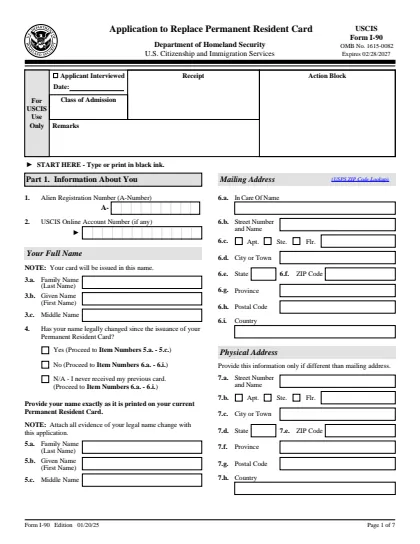
Part 1. Information About You. Your Full Name. NOTE: Your card will be issued in this name. 3. A. Enter Family Name (Last Name). Part 1. Information About You. Your Full Name. 3. B. Enter Given Name (First Name). Part 1. Information About You. Your Full Name. 3. C. Enter Middle Name. Part 1. Information About You. Your Full Name. 4. Has your name legally changed since the issuance of your Permanent Resident Card? Select Yes. (Proceed to Item Numbers 5. A. through 5. C.). Part 1. Information About You. Your Full Name. 4. Has your name legally changed since the issuance of your Permanent Resident Card? Select No (Proceed to Item Numbers 6. A. through 6. I.). Part 1. Information About You. Your Full Name. 4. Has your name legally changed since the issuance of your Permanent Resident Card? Select Not Applicable - I never received my previous card. (Proceed to Item Numbers 6. A Part 1. Information About You. Mailing Address. 6. A. Enter In Care Of Name. Part 1. Information About You. Mailing Address. 6. B. Enter Street Number and Name. Part 1. Information About You. Mailing Address. 6. D. Enter City or Town. Part 1. Information About You. Mailing Address. 6. H. Enter Postal Code. Part 1. Information About You. Mailing Address. 6. F. Enter ZIP Code. Part 1. Information About You. Mailing Address. 6. E. Select State from List of States. AA AE AK AL AP AR AS AZ CA CO CT DC DE FL FM GA GU HI IA ID IL IN KS KY LA MA MD ME MH MI MN MO MP MS MT NC ND NE NH NJ NM NV NY OH OK OR PA PR PW RI SC SD TN TX UT VA VI VT WA WI WV WY Part 1. Information About You. Mailing Address. 6. I. Enter Country. Part 1. Information About You. 2. Enter U S C I S Online Account Number, if any. Part 1. Information About You. Mailing Address. 6. G. Enter Province. Part 1. Information About You. 1. Enter Alien Registration Number. (A. Number). Part 1. Information About You. Mailing Address. 6. C. Select Apartment. Part 1. Information About You. Mailing Address. 6. C. Select Suite. Part 1. Information About You. Mailing Address. 6. C. Select Floor. Part 1. Information About You. Physical Address. Provide this information only if different than mailing address. 7. A. Enter Street Number and Name. Part 1. Information About You. Physical Address. 7. C. Enter City or Town. Part 1. Information About You. Physical Address. 7. E. Enter ZIP Code. Part 1. Information About You. Physical Address. 7. H. Enter Country. Part 1. Information About You. Physical Address. 7. G. Enter Postal Code. Part 1. Information About You. Physical Address. 7. F. Enter Province. Part 1. Information About You. Physical Address. 7. B. Select Apartment. Part 1. Information About You. Physical Address. 7. B. Select Suite. Part 1. Information About You. Physical Address. 7. B. Select Floor. Part 1. Information About You. Physical Address. 7 D. Select State from List of States. AA AE AK AL AP AR AS AZ CA CO CT DC DE FL FM GA GU HI IA ID IL IN KS KY LA MA MD ME MH MI MN MO MP MS MT NC ND NE NH NJ NM NV NY OH OK OR PA PR PW RI SC SD TN TX UT VA VI VT WA WI WV WY
Page 2 13 fields
Part 1. Information About You. Additional Information. 9. Enter Date of Birth. Enter as 2-digit Month, 2-digit Day, and 4-digit Year. Part 1. Information About You. Additional Information. 10. Enter City / Town / Village of Birth. Part 1. Information About You. Additional Information. 11. Enter Country of Birth. Part 1. Information About You. Additional Information. 16. Enter U. S. Social Security Number, if any. Part 1. Information About You. Additional Information. 15. Enter Date of Admission. Enter as 2-digit Month, 2-digit Day, and 4-digit Year. Part 1. Information About You. Additional Information. 14. Enter Class of Admission. Part 1. Information About You. Additional Information. Mother's Name. 12. Enter Given Name (First Name). Part 1. Information About You. Additional Information. Father's Name. 13. Enter Given Name (First Name). Part 1. Information About You. Additional Information. 8. Sex. Select Male. Part 1. Information About You. Additional Information. 8. Sex. Select Female. Part 2. Application Type. NOTE: If your conditional permanent resident status (for example: C R 1, C R 2, C F 1, C F 2) is expiring within the next 90 days, then do not file this application. (See the What is the Purpose Part 2. Application Type. My status is (Select only one box). 1. B. Select Permanent Resident - In Commuter Status. (Proceed to Section A.) Part 2. Application Type. My status is (Select only one box). 1. C. Select Conditional Permanent Resident. (Proceed to Section B.)
Page 3 40 fields
Part 3. Processing Information. 1. Enter Location where you applied for an immigrant visa or adjustment of status. Part 3. Processing Information. 2. Enter Location where your immigrant visa was issued or U S C I S office where you were granted adjustment of status. Part 3. Processing Information. Complete Item Numbers 3. A. and 3. A. 1. if you entered the United States with an immigrant visa. (If you were granted adjustment of status, proceed to Item Number 4.) 4. Have you ever bee Part 3. Processing Information. Complete Item Numbers 3. A. and 3. A. 1. if you entered the United States with an immigrant visa. (If you were granted adjustment of status, proceed to Item Number 4.) (2) Part 3. Processing Information. 5. Since you were granted permanent residence, have you ever filed Form I-4 07, Abandonment by Alien of Status as Lawful Permanent Resident, or otherwise been judged to have abandoned your Part 3. Processing Information. 5. Since you were granted permanent residence, have you ever filed Form I-4 07, Abandonment by Alien of Status as Lawful Permanent Resident, or otherwise been judged to (2) Part 3. Processing Information. Biographic Information. 8. Height. Feet. Select Number of Feet from List. 2 3 4 5 6 7 8 Part 3. Processing Information. Biographic Information. 8. Height. Inches. Select Number of Inches from List. 0 1 2 3 4 5 6 7 8 9 10 11 Part 3. Processing Information. Biographic Information. 9. Weight. Pounds. Enter First Digit of Weight in Pounds. Part 3. Processing Information. Biographic Information. 9. Weight. Pounds. Enter Second Digit of Weight in Pounds. Part 3. Processing Information. Biographic Information. 9. Weight. Pounds. Enter Third Digit of Weight in Pounds. Part 3. Processing Information. Biographic Information. 6. Ethnicity (Select only one box). Select Not Hispanic or Latino. Part 3. Processing Information. Biographic Information. 6. Ethnicity (Select only one box). Select Hispanic or Latino. Part 3. Processing Information. Biographic Information. 7. Race (Select all applicable boxes). Select Native Hawaiian or Other Pacific Islander. Part 3. Processing Information. Biographic Information. 7. Race (Select all applicable boxes). Select American Indian or Alaska Native. Part 3. Processing Information. Biographic Information. 7. Race (Select all applicable boxes). Select White. Part 3. Processing Information. Biographic Information. 7. Race (Select all applicable boxes). Select Asian. Part 3. Processing Information. Biographic Information. 7. Race (Select all applicable boxes). Select Black or African American. Part 3. Processing Information. Biographic Information. 10. Eye Color (Select only one box). Select Blue. Part 3. Processing Information. Biographic Information. 10. Eye Color (Select only one box). Select Green. Part 3. Processing Information. Biographic Information. 10. Eye Color (Select only one box). Select Hazel. Part 3. Processing Information. Biographic Information. 10. Eye Color (Select only one box). Select Pink. Part 3. Processing Information. Biographic Information. 10. Eye Color (Select only one box). Select Maroon. Part 3. Processing Information. Biographic Information. 10. Eye Color (Select only one box). Select Brown. Part 3. Processing Information. Biographic Information. 10. Eye Color (Select only one box). Select Black. Part 3. Processing Information. Biographic Information. 10. Eye Color (Select only one box). Select Unknown / Other. Part 3. Processing Information. Biographic Information. 10. Eye Color (Select only one box). Select Gray. Part 3. Processing Information. Complete Item Numbers 3. A. and 3. A. 1. if you entered the United States with an immigrant visa. (If you were granted adjustment of status, proceed to Item Number 4.) 3. A. 1. Port of Ent Part 3. Processing Information. Complete Item Numbers 3. A. and 3. A. 1. if you entered the United States with an immigrant visa. (If you were granted adjustment of status, proceed to Item Number 4.) 3. A. Enter Destinat Part 3. Processing Information. Biographic Information. 11. Hair Color (Select only one box). Select Bald (No hair). Part 3. Processing Information. Biographic Information. 11. Hair Color (Select only one box). Select Blond. Part 3. Processing Information. Biographic Information. 11. Hair Color (Select only one box). Select Gray. Part 3. Processing Information. Biographic Information. 11. Hair Color (Select only one box). Select Sandy. Part 3. Processing Information. Biographic Information. 11. Hair Color (Select only one box). Select Unknown / Other. Part 3. Processing Information. Biographic Information. 11. Hair Color (Select only one box). Select White. Part 3. Processing Information. Biographic Information. 11. Hair Color (Select only one box). Select Red. Part 3. Processing Information. Biographic Information. 11. Hair Color (Select only one box). Select Brown. Part 3. Processing Information. Biographic Information. 11. Hair Color (Select only one box). Select Black. Part 4. Accommodations for Individuals with Disabilities and/or Impairments. (Read the information in the Form I-90 instructions before completing this part.) 1. Are you requesting an accommodation because of a disabilit Part 4. Accommodations for Individuals with Disabilities and/or Impairments. (Read the information in the Form I-90 instructions before completing this part.) NOTE: If you need extra space to complete this section, use t
Page 4 7 fields
Part 5. Applicant's Statement, Contact Information, Certification, and Signature. Applicant's Statement. NOTE: Select the box for either Item Number 1. A. or 1. B. If applicable, select the box for Item Number 2. 1. B. S Part 5. Applicant's Statement, Contact Information, Certification, and Signature. NOTE: Read the Penalties section of the Form I-90 instructions before completing this part. Applicant's Statement. NOTE: Select the box fo Part 5. Applicant's Statement, Contact Information, Certification, and Signature. Applicant's Statement. NOTE: Select the box for either Item Number 1. A. or 1. B. If applicable, select the box for Item Number 2. 2. Sele Part 5. Applicant's Statement, Contact Information, Certification, and Signature. Applicant's Contact Information. 5. Enter Applicant's Email Address (if any). Part 5. Applicant's Statement, Contact Information, Certification, and Signature. Applicant's Contact Information. 3. Enter Applicant's Daytime Telephone Number. Part 5. Applicant's Statement, Contact Information, Certification, and Signature. Applicant's Contact Information. 4. Enter Applicant's Mobile Telephone Number (if any). Part 5. Applicant's Statement, Contact Information, Certification, and Signature. Applicant's Signature. 6. B. Enter Date of Signature. Enter as 2-digit Month, 2-digit Day, and 4-digit Year.
Page 5 34 fields
Part 6. Interpreter's Contact Information, Certification, and Signature. Interpreter's Full Name. 1. B. Enter Interpreter's Given Name (First Name). Part 6. Interpreter's Contact Information, Certification, and Signature. Provide the following information about the interpreter. Interpreter's Full Name. 1. A. Enter Interpreter's Family Name (Last Name). Part 6. Interpreter's Contact Information, Certification, and Signature. Interpreter's Full Name. 2. Enter Interpreter's Business or Organization Name (if any). Part 6. Interpreter's Contact Information, Certification, and Signature. Interpreter's Mailing Address. 3. C. Enter City or Town. Part 6. Interpreter's Contact Information, Certification, and Signature. Interpreter's Mailing Address. 3. A. Enter Street Number and Name. Part 6. Interpreter's Contact Information, Certification, and Signature. Interpreter's Mailing Address. 3. F. Enter Province. Part 6. Interpreter's Contact Information, Certification, and Signature. Interpreter's Mailing Address. 3. E. Enter ZIP Code. Part 6. Interpreter's Contact Information, Certification, and Signature. Interpreter's Mailing Address. 3. D. Select State from List of States. AA AE AK AL AP AR AS AZ CA CO CT DC DE FL FM GA GU HI IA ID IL IN KS KY LA MA MD ME MH MI MN MO MP MS MT NC ND NE NH NJ NM NV NY OH OK OR PA PR PW RI SC SD TN TX UT VA VI VT WA WI WV WY Part 6. Interpreter's Contact Information, Certification, and Signature. Interpreter's Mailing Address. 3. H. Enter Country. Part 6. Interpreter's Contact Information, Certification, and Signature. Interpreter's Mailing Address. 3. G. Enter Postal Code. Part 6. Interpreter's Contact Information, Certification, and Signature. Interpreter's Mailing Address. 3. B. Select Apartment. Part 6. Interpreter's Contact Information, Certification, and Signature. Interpreter's Mailing Address. 3. B. Select Suite. Part 6. Interpreter's Contact Information, Certification, and Signature. Interpreter's Mailing Address. 3. B. Select Floor. Part 6. Interpreter's Contact Information, Certification, and Signature. Interpreter's Contact Information. 6. Enter Interpreter's Email Address, (if any). Part 6. Interpreter's Contact Information, Certification, and Signature. Interpreter's Contact Information. 4. Enter Interpreter's Daytime Telephone Number. Part 6. Interpreter's Contact Information, Certification, and Signature. Interpreter's Contact Information. 5. Enter Interpreter's Mobile Telephone Number (if any). Part 6. Interpreter's Contact Information, Certification, and Signature. Interpreter's Certification. I certify, under penalty of perjury, that: I am fluent in English and (another language), which is the same language p Part 6. Interpreter's Contact Information, Certification, and Signature. Interpreter's Signature. 7. B. Enter Date of Signature. Enter as 2-digit Month, 2-digit Day, and 4-digit Year. Part 7. Contact Information, Declaration, and Signature of the Person Preparing this Application, if Other Than the Applicant. Provide the following information about the preparer. Preparer's Full Name. 1. A. Enter Prepa Part 7. Contact Information, Declaration, and Signature of the Person Preparing This Application, If Other Than the Applicant. Preparer's Full Name. 1.B. Enter Preparer's Given Name (First Name). Part 7. Contact Information, Declaration, and Signature of the Person Preparing This Application, If Other Than the Applicant. Preparer's Full Name. 2. Enter Preparer's Business or Organization Name (if any). Part 7. Contact Information, Declaration, and Signature of the Person Preparing This Application, If Other Than the Applicant. Preparer's Mailing Address. 3. C. Enter City or Town. Part 7. Contact Information, Declaration, and Signature of the Person Preparing This Application, If Other Than the Applicant. Preparer's Mailing Address. 3. A. Enter Street Number and Name. Part 7. Contact Information, Declaration, and Signature of the Person Preparing This Application, If Other Than the Applicant. Preparer's Mailing Address. 3. F. Enter Province. Part 7. Contact Information, Declaration, and Signature of the Person Preparing This Application, If Other Than the Applicant. Preparer's Mailing Address. 3. E. Enter Zip Code. Part 7. Contact Information, Declaration, and Signature of the Person Preparing This Application, If Other Than the Applicant. Preparer's Mailing Address. 3. D. Select State from List of States. AA AE AK AL AP AR AS AZ CA CO CT DC DE FL FM GA GU HI IA ID IL IN KS KY LA MA MD ME MH MI MN MO MP MS MT NC ND NE NH NJ NM NV NY OH OK OR PA PR PW RI SC SD TN TX UT VA VI VT WA WI WV WY Part 7. Contact Information, Declaration, and Signature of the Person Preparing This Application, If Other Than the Applicant. Preparer's Mailing Address. 3. H. Enter Country. Part 7. Contact Information, Declaration, and Signature of the Person Preparing This Application, If Other Than the Applicant. Preparer's Mailing Address. 3. G. Enter Postal Code. Part 7. Contact Information, Declaration, and Signature of the Person Preparing This Application, If Other Than the Applicant. Preparer's Mailing Address. 3. B. Select Apartment. Part 7. Contact Information, Declaration, and Signature of the Person Preparing This Application, If Other Than the Applicant. Preparer's Mailing Address. 3. B. Select Suite. Part 7. Contact Information, Declaration, and Signature of the Person Preparing This Application, If Other Than the Applicant. Preparer's Mailing Address. 3. B. Select Floor. Part 7. Contact Information, Declaration, and Signature of the Person Preparing This Application, If Other Than the Applicant. Preparer's Contact Information. 6. Enter Preparer's Email Address (if any). Part 7. Contact Information, Declaration, and Signature of the Person Preparing This Application, If Other Than the Applicant. Preparer's Contact Information. 4. Enter Preparer's Daytime Telephone Number. Part 7. Contact Information, Declaration, and Signature of the Person Preparing This Application, If Other Than the Applicant. Preparer's Contact Information. 5. Enter Preparer's Mobile Telephone Number (if any).
Page 6 3 fields
Part 7. Contact Information, Declaration, and Signature of the Person Preparing This Application, If Other Than the Applicant. Preparer's Statement. 7. A. Select I am not an attorney or accredited representative but have Part 7. Contact Information, Declaration, and Signature of the Person Preparing This Application, If Other Than the Applicant. Preparer's Statement. 7. B. Select I am an attorney or accredited representative and my repre Part 7. Contact Information, Declaration, and Signature of the Person Preparing This Application, If Other Than the Applicant. Preparer's Signature. 8. B. Enter Date of Signature. Enter as 2-digit Month, 2-digit Day, and
Page 7 20 fields
Part 8. Additional Information. 3. D. Enter Additional Information. Part 8. Additional Information. 6. A. Enter Page Number. Part 8. Additional Information. 6. B. Enter Part Number. Part 8. Additional Information. 6. C. Enter Item Number. Part 8. Additional Information. 6. D. Enter Additional Information. Part 8. Additional Information. 5. D. Enter Additional Information. Part 8. Additional Information. 3. A. Enter Page Number. Part 8. Additional Information. 3. B. Enter Part Number. Part 8. Additional Information. 3. C. Enter Item Number. Part 8. Additional Information. 5. A. Enter Page Number. Part 8. Additional Information. 5. B. Enter Part Number. Part 8. Additional Information. 5. C. Enter Item Number. Part 8. Additional Information. 4. A. Enter Page Number. Part 8. Additional Information. 4. B. Enter Part Number. Part 8. Additional Information. 4. C. Enter Item Number. Part 8. Additional Information. 4. D. Enter Additional Information. Part 8. Additional Information. 7. A. Enter Page Number. Part 8. Additional Information. 7. B. Enter Part Number. Part 8. Additional Information. 7. C. Enter Item Number. Part 8. Additional Information. 7. D. Enter Additional Information.