Page 1 52 fields
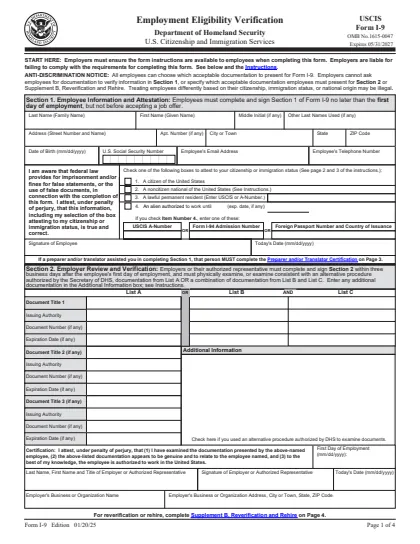
Employee Last Name (Family Name) Section 1., Enter First Name (Given Name). Section 1., Enter Middle Initial, if any Section 1., Enter Other Last Names Used (if any) Section 1., Enter Address (Street Number and Name). Section 1., Enter Apartment Number, if any Section 1., Enter City or Town. Section 1., Select State from the drop down list. AK AL AR AS AZ CA CO CT DC DE FL GA GU HI IA ID IL IN KS KY LA MA MD ME MI MN MO MP MS MT NC ND NE NH NJ NM NV NY OH OK OR PA PR RI SC SD TN TX UT VA VI VT WA WI WV WY CAN MEX Section 1., Enter ZIP Code. Section 1., Enter Date of Birth as 2-digit Month, 2-digit Day, and 4-digit Year. Section 1: Enter U.S. Social Security Number. Section 1., Enter Employee's E-mail Address. Section 1., Enter Employee's Telephone Number. Section 1. Employee Information and Attestation. I am aware that federal law provides for imprisonment and/or fines for false statements, or the use of false documents, in connection with the completion of this form. I a Section 1. Employee Information and Attestation. 2. A noncitizen of the United States. (See Instructions) Section 1. Employee Information and Attestation. 3. A lawful permanent resident. Section 1., If selected Item Number 3. enter Alien Registration Number or USCIS Number Section 1. Employee Information and Attestation. 4. An alien authorized to work until (exp. date, if any) Exp. Date mmddyyyy Section 1., Employee Information and Attestation. If you checked Item Number 4., enter one of these. USCIS/A-Number or Form I-94 Admission Number or Foreign Passport Number and Country of Issuance. Enter USCIS Alien Regi Section 1., Employee Information and Attestation. Enter Form I-94 Admission Number. Section 1., Employee Information and Attestation. Enter Foreign Passport Number and Country of Issuance. Section 1. Employee Information and Attestation. Enter Signature of Employee. If a preparer and or translator who assisted you in completing Section 1 that person must complete the Preparer and/or Translator Certificatio Section 1., Enter Today's Date of Signature as 2-digit Month, 2-digit Day, and 4-digit Year. Supplement B, Re verification and Rehire (formerly Section 3). Enter the Document Title. Section 2. List A. Issuing Authority 1. Section 2. List A. Document Number 1. (if any) Section 2. List A. Enter Expiration Date 1. (if any). Section 2. Employer Review and Verification. Enter Document Title 2. If any. Section 2. Employer Review and Verification. List A. Enter Issuing Authority 2. Section 2. Employer Review and Verification. List A. Enter Document Number 2. If any. Section 2. Employer Review and Verification. List A. Enter Expiration Date 2 as 2 digit for the month, 2 digit for the day and 4 digit for the year (if any). Section 2. Employer Review and Verification. List A. Enter Document Title 3. If any. Section 2. Employer Review and Verification. List A. Enter Issuing Authority 3. Section 2. Employer Review and Verification. List A. Enter Document Number 3. If any. Section 2. Employer Review and Verification. List A. Enter Expiration Date 3 as 2 digit for the month, 2 digit for the day and 4 digit for the year (if any). List B AND Section 2. Employer Review and Verification. List B. Enter Issuing Authority. Section 2. Employer Review and Verification. List B. Enter Document Number. Section 2. Employer Review and Verification. List B. Enter Expiration Date as 2 digit for the month, 2 digit for the day and 4 digit for the year (if any). Section 2. Employer Review and Verification. List C. Enter Document Title. Section 2. Employer Review and Verification. List C. Enter Issuing Authority. Section 2. Employer Review and Verification. List C. Enter Document Number. Section 2. Employer Review and Verification. List C. Enter Expiration Date as 2 digit for the month, 2 digit for the day and 4 digit for the year (if any). Enter Additional Information Check here if you used an alternative procedure authorized by DHS to examine documents. Section 2. Employer Review and Verification. Enter First Day of Employment as 2-digit Month, 2-digit Day, and 4-digit Year. Section 2. Employer Review and Verification. Enter Last Name, First Name and Title of Employer or Authorized Representative. Section 2. Employer Review and Verification. Enter Signature of Employer or Authorized Representative. Section 2., Enter Today's Date of Signature as 2-digit Month, 2-digit Day, and 4-digit Year. Section 2., Employer Review and Verification. Enter Employer's Business or Organization Name Employer's Business or Organization Address
Page 3 38 fields
Supplement A, Preparer and / or Translator Certification for Section 1. Employee Information from Section 1. Enter the Last Name (Family Name). Supplement A, Preparer and / or Translator Certification for Section 1. Employee Information from Section 1. Enter the First Name (Given Name). Supplement A, Preparer and / or Translator Certification for Section 1. Employee Information from Section 1. Enter the Middle Initial (if any). Signature of Preparer or Translator: This field cannot be signed electronically. Please print and sign in ink. Signature Date mm/dd/yyyy Preparer or Translator Last Name (Family Name) Preparer or Translator First Name (Given Name) Enter Preparer or Translator Middle Initial (if any) Preparer or Translator Address (Street Number and Name) Preparer or Translator City or Town Preparer and or Translator State: Enter the State. AK AL AR AS AZ CA CO CT DC DE FL GA GU HI IA ID IL IN KS KY LA MA MD ME MI MN MO MP MS MT NC ND NE NH NJ NM NV NY OH OK OR PA PR RI SC SD TN TX UT VA VI VT WA WI WV WY CAN MEX Preparer or Translator Zip Code. Signature of Preparer or Translator: This field cannot be signed electronically. Please print and sign in ink. (2) Signature Date mm/dd/yyyy (2) Preparer or Translator Last Name (Family Name) (2) Enter Preparer or Translator Middle Initial (if any) (2) Preparer or Translator Address (Street Number and Name) (2) Preparer or Translator City or Town (2) Preparer and or Translator State: Enter the State. (2) AK AL AR AS AZ CA CO CT DC DE FL GA GU HI IA ID IL IN KS KY LA MA MD ME MI MN MO MP MS MT NC ND NE NH NJ NM NV NY OH OK OR PA PR RI SC SD TN TX UT VA VI VT WA WI WV WY CAN MEX Supplement A, Preparer and or Translator Certification for Section 1. Enter Zip Code. Signature of Preparer or Translator: This field cannot be signed electronically. Please print and sign in ink. (3) Signature Date mm/dd/yyyy (3) Preparer or Translator Last Name (Family Name) (3) Preparer or Translator First Name (Given Name) (2) Enter Preparer or Translator Middle Initial (if any) (3) Preparer or Translator Address (Street Number and Name) (3) Preparer or Translator City or Town (3) Preparer and or Translator State: Enter the State. (3) AK AL AR AS AZ CA CO CT DC DE FL GA GU HI IA ID IL IN KS KY LA MA MD ME MI MN MO MP MS MT NC ND NE NH NJ NM NV NY OH OK OR PA PR RI SC SD TN TX UT VA VI VT WA WI WV WY CAN MEX Preparer or Translator ZIP Code Signature of Preparer or Translator: This field cannot be signed electronically. Please print and sign in ink. (4) Signature Date mm/dd/yyyy (4) Preparer or Translator Last Name (Family Name) (4) Preparer or Translator First Name (Given Name) (3) Enter Preparer or Translator Middle Initial (if any) (4) Preparer or Translator Address (Street Number and Name) (4) Preparer or Translator City or Town (4) Preparer and or Translator State: Enter the State. (4) AK AL AR AS AZ CA CO CT DC DE FL GA GU HI IA ID IL IN KS KY LA MA MD ME MI MN MO MP MS MT NC ND NE NH NJ NM NV NY OH OK OR PA PR RI SC SD TN TX UT VA VI VT WA WI WV WY CAN MEX Preparer or Translator ZIP Code (2)
Page 4 38 fields
Reverification and Rehire. Employee Information from Section 1. Last Name (Family Name). Reverification and Rehire. Employee Information from Section 1. First Name (Given Name). Supplement B, Re verification and Rehire (formerly Section 3). Employee Information from Section 1. Enter the Middle Initial (if any). Instructions: This supplement replaces Section 3 on the previous version of Form I-9. Supplement B, Re verification and Rehire (formerly Section 3). Date of Rehire, if applicable. Enter Date as 2 digit month, 2 digit day and 4 digit year. Supplement B, Re verification and Rehire (formerly Section 3). New Name, if applicable. Enter Last Name (Family Name). Reverification and Rehire. New Name, if applicable. First Name (Given Name). Supplement B, Re verification and Rehire (formerly Section 3). New Name, if applicable. Enter Middle Initial. Supplement B, Re verification and Rehire (formerly Section 3). Enter the Document Title. Supplement B, Re verification and Rehire (formerly Section 3). Enter the Document Number (if any). Supplement B. Re verification and Rehire (formerly Section 3). Expiration Date (if any) (mm/dd/yyyy). Enter Expiration Date as 2 digit for the month, 2 digit for the day and 4 digit for the year (if any). Supplement B, Re verification and Rehire (formerly Section 3). Enter name of Employer or Authorized Representative. Supplement B, Re verification and Rehire (formerly Section 3). Enter Signature of Employer or Authorized Representative. Supplement B. Re verification and Rehire (formerly Section 3) Enter Today's date of Authorized Representative Signature as 2-digit Month, 2-digit Day, and 4-digit Year. Supplement B, Re verification and Rehire (formerly Section 3). Enter Additional Information (Initial and date each notation.) Check here if you used an alternative procedure authorized by DHS to examine documents. Supplement B, Re verification and Rehire (formerly Section 3). Date of Rehire, if applicable. Enter Date as 2 digit month, 2 digit day and 4 digit year. (2) Supplement B, Re verification and Rehire (formerly Section 3). New Name, if applicable. Enter Last Name (Family Name). (2) Supplement B, Re verification and Rehire (formerly Section 3). New Name, if applicable. Enter First Name (Given Name). Supplement B, Re verification and Rehire (formerly Section 3). New Name, if applicable. Enter Middle Initial. (2) Supplement B, Re verification and Rehire (formerly Section 3). Enter the Document Number (if any). (2) Supplement B. Re verification and Rehire (formerly Section 3). Expiration Date (if any) (mm/dd/yyyy). Enter Expiration Date as 2 digit for the month, 2 digit for the day and 4 digit for the year (if a (2) Supplement B, Re verification and Rehire (formerly Section 3). Enter name of Employer or Authorized Representative. (2) Supplement B, Re verification and Rehire (formerly Section 3). Enter Signature of Employer or Authorized Representative. (2) Supplement B. Re verification and Rehire (formerly Section 3) Enter Today's date of Authorized Representative Signature as 2-digit Month, 2-digit Day, and 4-digit Year. (2) Supplement B, Re verification and Rehire (formerly Section 3). Enter Additional Information (Initial and date each notation.) (2) Check here if you used an alternative procedure authorized by DHS to examine documents. (2) Reverification and Rehires. Date of Rehire, if applicable. Enter Date mmddyyyy Supplement B, Re verification and Rehire (formerly Section 3). New Name, if applicable. Enter Last Name (Family Name). (3) Supplement B, Re verification and Rehire (formerly Section 3). New Name, if applicable. Enter First Name (Given Name). (2) Supplement B, Re verification and Rehire (formerly Section 3). New Name, if applicable. Enter Middle Initial. (3) Supplement B, Re verification and Rehire (formerly Section 3). Enter the Document Title. (2) Supplement B, Re verification and Rehire (formerly Section 3). Enter the Document Number (if any). (3) Supplement B. Re verification and Rehire (formerly Section 3). Expiration Date (if any) (mm/dd/yyyy). Enter Expiration Date as 2 digit for the month, 2 digit for the day and 4 digit for the year (if a (3) Supplement B, Re verification and Rehire (formerly Section 3). Enter name of Employer or Authorized Representative. (3) Supplement B, Re verification and Rehire (formerly Section 3). Enter Signature of Employer or Authorized Representative. (3) Supplement B. Re verification and Rehire (formerly Section 3) Enter Today's date of Authorized Representative Signature as 2-digit Month, 2-digit Day, and 4-digit Year. (3) Supplement B, Re verification and Rehire (formerly Section 3). Enter Additional Information (Initial and date each notation.) (3) Check here if you used an alternative procedure authorized by DHS to examine documents. (3)