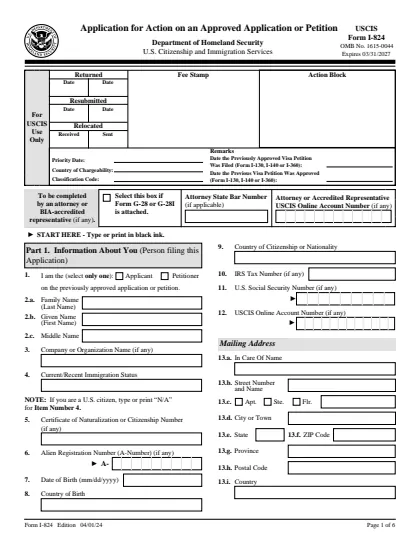
Page 1 30 fields
To be completed by an attorney or B I. A. accredited representative, if any. Select this box if Form G - 28 or G - 28I is attached. To be completed by an attorney or B I. A. accredited representative, if any. Enter Attorney State Bar Number, if applicable. To be completed by an attorney or B I. A. accredited representative, if any. Enter Attorney or Accredited Representative U S C I S Online Account Number, if any. START HERE - Type or print in black ink. Part 1. Information About You (Person filing this Application). 1. I am the (select only one): Select Applicant. on the previously approved application or petition. Part 1. Information About You (Person filing this Application). 1. I am the (select only one): Select Petitioner. on the previously approved application or petition. Part 1. Information About You (Person filing this Application). 2. A. Enter Family Name (Last Name). Part 1. Information About You (Person filing this Application). 2. B. Enter Given Name (First Name). Part 1. Information About You (Person filing this Application). 2. C. Enter Middle Name. Part 1. Information About You (Person filing this Application). 3. Enter Company or Organization Name, if any. Part 1. Information About You (Person filing this Application). 4. Enter Current or Recent Immigration Status. NOTE: If you are a U.S. citizen, type or print “N/A” for Item Number 4. Part 1. Information About You (Person filing this Application). 5. Enter Certificate of Naturalization or Citizenship Number, if any. Part 1. Information About You (Person filing this Application). 6. Enter Alien Registration Number (A. Number), if any. 9 digits. Part 1. Information About You (Person filing this Application). 7. Enter Date of Birth. Enter as 2-digit Month, 2-digit Day, and 4-digit Year. Part 1. Information About You (Person filing this Application). 8. Enter Country of Birth. Part 1. Information About You (Person filing this Application). 9. Enter Country of Citizenship or Nationality. Part 1. Information About You (Person filing this Application). 10. Enter Internal Revenue Service (I R S) Tax Number, if any. Part 1. Information About You (Person filing this Application). 11. Enter U.S. Social Security Number, if any. 9 digits. Part 1. Information About You (Person filing this Application). 12. Enter U S C I S Online Account Number, if any. 12 characters Part 1. Information About You (Person filing this Application). Mailing Address. 13. A. Enter In Care Of Name. Part 1. Information About You (Person filing this Application). Mailing Address. 13. B. Enter Street Number and Name. Part 1. Information About You (Person filing this Application). Mailing Address. 13. C. Select Apartment. Part 1. Information About You (Person filing this Application). Mailing Address. 13. C. Select Suite. Part 1. Information About You (Person filing this Application). Mailing Address. 13. C. Select Floor. Part 1. Information About You (Person filing this Application). Mailing Address. 13. C. Enter Apartment, Suite or Floor Number. Part 1. Information About You (Person filing this Application). Mailing Address. 13. D. Enter City or Town. Part 1. Information About You (Person filing this Application). Mailing Address. 13. E. Select State from List of States. AA AE AK AL AP AR AS AZ CA CO CT DC DE FL FM GA GU HI IA ID IL IN KS KY LA MA MD ME MH MI MN MO MP MS MT NC ND NE NH NJ NM NV NY OH OK OR PA PR PW RI SC SD TN TX UT UT VA VI VT WA WI WV WY Part 1. Information About You (Person filing this Application). Mailing Address. 13. F. Enter Zip Code. Part 1. Information About You (Person filing this Application). Mailing Address. 13. G. Enter Province. Part 1. Information About You (Person filing this Application). Mailing Address. 13. H. Enter Postal Code. Part 1. Information About You (Person filing this Application). Mailing Address. 13. I. Enter Country.
Page 2 39 fields
Part 1. Information About You (Person filing this Application). Physical Address. 14. A. Enter Street Number and Name. Part 1. Information About You (Person filing this Application). Physical Address. 14. B. Select Apartment. Part 1. Information About You (Person filing this Application). Physical Address. 14. B. Select Suite. Part 1. Information About You (Person filing this Application). Physical Address. 14. B. Select Floor. Part 1. Information About You (Person filing this Application). Physical Address. 14. B. Enter Apartment, Suite or Floor Number. Part 1. Information About You (Person filing this Application). Physical Address. 14. C. Enter City or Town. Part 1. Information About You (Person filing this Application). Physical Address. 14. D. Select State from List of States. AA AE AK AL AP AR AS AZ CA CO CT DC DE FL FM GA GU HI IA ID IL IN KS KY LA MA MD ME MH MI MN MO MP MS MT NC ND NE NH NJ NM NV NY OH OK OR PA PR PW RI SC SD TN TX UT UT VA VI VT WA WI WV WY Part 1. Information About You (Person filing this Application). Physical Address. 14. E. Enter Zip Code. Part 1. Information About You (Person filing this Application). Physical Address. 14. F. Enter Province. Part 1. Information About You (Person filing this Application). Physical Address. 14. G. Enter Postal Code. Part 1. Information About You (Person filing this Application). Physical Address. 14. H. Enter Country. Part 2. Reason for Request. I am requesting (select one). 1. A. Select A duplicate approval notice. Part 2. Reason for Request. I am requesting (select one). 1. B. Select U. S. Citizenship and Immigration Services (U S C I S) to notify a new U. S. Consulate, different from the one that I originally requested, through t Part 2. Reason for Request. I am requesting (select one). Select 1. C. U S C I S to notify a U. S. Consulate through the National Visa Center (N V C) about my adjustment of status to permanent resident in the United Stat Part 2. Reason for Request. I am requesting (select one). Select 1. D. U S C I S to send my approved immigrant visa petition to the National Visa Center (N V C). Part 2. Reason for Request. I am requesting (select one). Select 1. E. U S C I S to notify the U. S. Department of State that I have become a U. S. Citizen through naturalization. Part 3. Other Information. Provide the following information about the principal beneficiary of the previous application or petition, if other than you. 1. A. Enter Form Number of Previously Approved Application or Petit Part 3. Other Information. 1. B. Enter Receipt Number (On Form I - 7 97, Notice of Action). Part 3. Other Information. 1. C. Enter Filing Date of Application or Petition. Enter as 2-digit Month, 2-digit Day and 4-digit Year. Part 3. Other Information. 1. D. Enter Approval Date. Enter as 2-digit Month, 2-digit Day and 4-digit Year. Part 3. Other Information. 2. A. Enter Family Name (Last Name). Part 3. Other Information. 2. B. Enter Given Name (First Name). Part 3. Other Information. 2. C. Enter Middle Name. Part 3. Other Information. 2. D. Enter Date of Birth. Enter as 2-digit Month, 2-digit Day, and 4-digit Year. Part 3. Other Information. 2. E. Enter Country of Birth. Part 3. Other Information. 2. F. Enter Alien Registration Number (A. Number), if any. 9 digits. Part 3. Other Information. 2. G. Enter Daytime Telephone Number. Part 3. Other Information. Mailing Address. 3. A. Enter In Care Of Name. Part 3. Other Information. Mailing Address. 3. B. Enter Street Number and Name. Part 3. Other Information. Mailing Address. 3. C. Select Apartment. Part 3. Other Information. Mailing Address. 3. C. Select Suite. Part 3. Other Information. Mailing Address. 3. C. Select Floor. Part 3. Other Information. Mailing Address. 3. C. Enter Apartment, Suite or Floor Number. Part 3. Other Information. Mailing Address. 3. D. Enter City or Town. Part 3. Other Information. Mailing Address. 3. E. Select State from List of States. AA AE AK AL AP AR AS AZ CA CO CT DC DE FL FM GA GU HI IA ID IL IN KS KY LA MA MD ME MH MI MN MO MP MS MT NC ND NE NH NJ NM NV NY OH OK OR PA PR PW RI SC SD TN TX UT UT VA VI VT WA WI WV WY Part 3. Other Information. Mailing Address. 3. F. Enter Zip Code. Part 3. Other Information. Mailing Address. 3. G. Enter Province. Part 3. Other Information. Mailing Address. 3. H. Enter Postal Code. Part 3. Other Information. Mailing Address. 3. I. Enter Country.
Page 3 38 fields
Part 3. Other Information. Physical Address. 4. A. Enter Street Number and Name. Part 3. Other Information. Physical Address. 4. B. Select Apartment. Part 3. Other Information. Physical Address. 4. B. Select Suite. Part 3. Other Information. Physical Address. 4. B. Select Floor. and Name. Part 3. Other Information. Physical Address. 4. B. Enter Apartment, Suite or Floor Number. Part 3. Other Information. Physical Address. 4. C. Enter City or Town. Part 3. Other Information. Physical Address. 4. D. Select State from List of States. AA AE AK AL AP AR AS AZ CA CO CT DC DE FL FM GA GU HI IA ID IL IN KS KY LA MA MD ME MH MI MN MO MP MS MT NC ND NE NH NJ NM NV NY OH OK OR PA PR PW RI SC SD TN TX UT UT VA VI VT WA WI WV WY Part 3. Other Information. Physical Address. 4. E. Enter Zip Code. Part 3. Other Information. Physical Address. 4. F. Enter Province. Part 3. Other Information. Physical Address. 4. G. Enter Postal Code. Part 3. Other Information. Physical Address. 4. H. Enter Country. Part 3. Other Information. Dependents. If you selected Part 2., Item Number 1. C., provide the following information about the dependents for whom you are requesting follow-to-join benefits. If you need additional space Part 3. Other Information. Dependents. 5. B. Enter Given Name (First Name). Part 3. Other Information. Dependents. 5. C. Enter Middle Name. Part 3. Other Information. Dependents. 6. Enter Date of Birth. Enter as 2-digit Month, 2-digit Day, and 4-digit Year. Part 3. Other Information. Dependents. 7. Enter Country of Birth. Part 3. Other Information. Dependents. 8. Enter Country of Citizenship or Nationality. Part 3. Other Information. Dependents. 9. Enter Relationship to Principal Applicant. Part 3. Other Information. Dependents. 10. Enter Dependent's Email Address, if any. Part 3. Other Information. Dependents. 11. Enter Dependent's Daytime Telephone Number. Part 3. Other Information. Dependents. 12. A. Enter Family Name (Last Name). Part 3. Other Information. Dependents. 12. B. Enter Given Name (First Name). Part 3. Other Information. Dependents. 12. C. Enter Middle Name. Part 3. Other Information. Dependents. 13. Enter Date of Birth. Enter as 2-digit Month, 2-digit Day, and 4-digit Year. Part 3. Other Information. Dependents. 14. Enter Country of Birth. Part 3. Other Information. Dependents. 15. Enter Country of Citizenship or Nationality. Part 3. Other Information. Dependents. 16. Enter Relationship to Principal Applicant. Part 3. Other Information. Dependents. 17. Enter Dependent's Email Address, if any. Part 3. Other Information. Dependents. 18. Enter Dependent's Daytime Telephone Number. Part 3. Other Information. Dependents. 19. A. Enter Family Name (Last Name). Part 3. Other Information. Dependents. 19. B. Enter Given Name (First Name). Part 3. Other Information. Dependents. 19. C. Enter Middle Name. Part 3. Other Information. Dependents. 21. Enter Country of Birth. Part 3. Other Information. Dependents. 20. Enter Date of Birth. Enter as 2-digit Month, 2-digit Day, and 4-digit Year. Part 3. Other Information. Dependents. 22. Enter Country of Citizenship or Nationality. Part 3. Other Information. Dependents. 23. Enter Relationship to Principal Applicant. Part 3. Other Information. Dependents. 24. Enter Dependent's Email Address, if any. Part 3. Other Information. Dependents. 25. Enter Dependent's Daytime Telephone Number.
Page 4 27 fields
Part 3. Other Information. Dependents. 26. A. Enter Family Name (Last Name). Part 3. Other Information. Dependents. 26. B. Enter Given Name (First Name). Part 3. Other Information. Dependents. 26. C. Enter Middle Name. Part 3. Other Information. Dependents. 27. Enter Date of Birth. Enter as 2-digit Month, 2-digit Day, and 4-digit Year. Part 3. Other Information. Dependents. 28. Enter Country of Birth. Part 3. Other Information. Dependents. 29. Enter Country of Citizenship or Nationality. Part 3. Other Information. Dependents. 30. Enter Relationship to Principal Applicant. Part 3. Other Information. Dependents. 31. Enter Dependent's Email Address, if any. Part 3. Other Information. Dependents. 32. Enter Dependent's Daytime Telephone Number. Part 3. Other Information. Foreign Address of Dependents. 33. A. Enter In Care Of Name. Part 3. Other Information. Foreign Address of Dependents. 33. B. Enter Street Number and Name. Part 3. Other Information. Foreign Address of Dependents. 33. C. Select Apartment. Part 3. Other Information. Foreign Address of Dependents. 33. C. Select Suite. Part 3. Other Information. Foreign Address of Dependents. 33. C. Select Floor. Part 3. Other Information. Foreign Address of Dependents. 33. C. Enter Apartment, Suite or Floor Number. Part 3. Other Information. Foreign Address of Dependents. 33. D. Enter City or Town. Part 3. Other Information. Foreign Address of Dependents. 33. E. Enter Province. Part 3. Other Information. Foreign Address of Dependents. 33. F. Enter Postal Code. Part 3. Other Information. Foreign Address of Dependents. 33. G. Enter Country. Part 3. Other Information. Contact Information of Dependents. 34. Enter Foreign Telephone Number. Part 4. Applicant's Contact Information, Certification, and Signature. Applicant's Contact Information. 1. Enter Applicant's Daytime Telephone Number. Part 4. Applicant's Contact Information, Certification, and Signature. Applicant's Contact Information. 2. Enter Applicant's Mobile Telephone Number, if any. Part 4. Applicant's Contact Information, Certification, and Signature. Applicant's Contact Information. 3. Enter Applicant's Email Address, if any. Part 4. Applicant's Contact Information, Certification, and Signature. Applicant’s Signature. 4. Enter Date of Signature. Enter as 2-digit Month, 2-digit Day and 4-digit Year. NOTE TO ALL APPLICANTS: If you do not comple Part 5. Interpreter's Contact Information, Certification, and Signature. Interpreter's Full Name. 1. Enter Interpreter's Family Name (Last Name). Part 5. Interpreter's Contact Information, Certification, and Signature. Interpreter's Full Name. 2. Enter Interpreter's Given Name (First Name). Part 5. Interpreter's Contact Information, Certification, and Signature. 2. Enter Interpreter's Business or Organization Name.
Page 5 12 fields
Part 5. Interpreter's Contact Information, Certification, and Signature. Interpreter's Contact Information. 3. Enter Interpreter's Daytime Telephone Number. Part 5. Interpreter's Contact Information, Certification, and Signature. Interpreter's Contact Information. 4. Enter Interpreter's Mobile Telephone Number (if any). Part 5. Interpreter's Contact Information, Certification, and Signature. Interpreter's Contact Information. 5. Enter Interpreter's Email Address, if any. Part 5. Interpreter's Contact Information, Certification, and Signature. Interpreter's Certification and Signature. I certify, under penalty of perjury, that I am fluent in English and I have interpreted every question o Part 5. Interpreter's Contact Information, Certification, and Signature. Interpreter's Signature. 6. Enter Date of Signature. Enter as 2-digit Month, 2-digit Day and 4-digit Year. Part 6. Contact Information, Declaration, and Signature of the Person Preparing this Application, if Other Than the Applicant. Preparer's Full Name. 1. Enter Preparer's Family Name (Last Name). Part 6. Contact Information, Declaration, and Signature of the Person Preparing this Application, if Other Than the Applicant. Preparer's Full Name. Enter Preparer's Given Name (First Name). Part 6. Contact Information, Declaration, and Signature of the Person Preparing this Application, if Other Than the Applicant. Preparer's Full Name. 2. Enter Preparer's Business or Organization Name, if any. Part 6. Contact Information, Declaration, and Signature of the Person Preparing this Application, if Other Than the Applicant. Preparer's Contact Information. 3. Enter Preparer's Daytime Telephone Number. Part 6. Contact Information, Declaration, and Signature of the Person Preparing this Application, if Other Than the Applicant. Preparer's Contact Information. 4. Enter Preparer's Mobile Telephone Number (if any). Part 6. Contact Information, Declaration, and Signature of the Person Preparing this Application, if Other Than the Applicant. Preparer's Contact Information. 5. Enter Preparer's Email Address, if any. Part 6. Contact Information, Certification, and Signature. Certification and Statement. Preparer's Signature. 6. Enter Date of Signature. Enter as 2-digit Month, 2-digit Day and 4-digit Year.
Page 6 20 fields
Part 7. Additional Information. 3. D. Enter Additional Information. Part 7. Additional Information. 3. A. Enter Page Number. Part 7. Additional Information. 3. B. Enter Part Number. Part 7. Additional Information. 3. C. Enter Item Number. Part 7. Additional Information. 6. A. Enter Page Number. Part 7. Additional Information. 6. B. Enter Part Number. Part 7. Additional Information. 6. C. Enter Item Number. Part 7. Additional Information. 6. D. Enter Additional Information. Part 7. Additional Information. 4. D. Enter Additional Information. Part 7. Additional Information. 4. A. Enter Page Number. Part 7. Additional Information. 4. B. Enter Part Number. Part 7. Additional Information. 4. C. Enter Item Number. Part 7. Additional Information. 5. D. Enter Additional Information. Part 7. Additional Information. 5. A. Enter Page Number. Part 7. Additional Information. 5. B. Enter Part Number. Part 7. Additional Information. 5. C. Enter Item Number. Part 7. Additional Information. 7. A. Enter Page Number. Part 7. Additional Information. 7. B. Enter Part Number. Part 7. Additional Information. 7. C. Enter Item Number. Part 7. Additional Information. 7. D. Enter Additional Information.