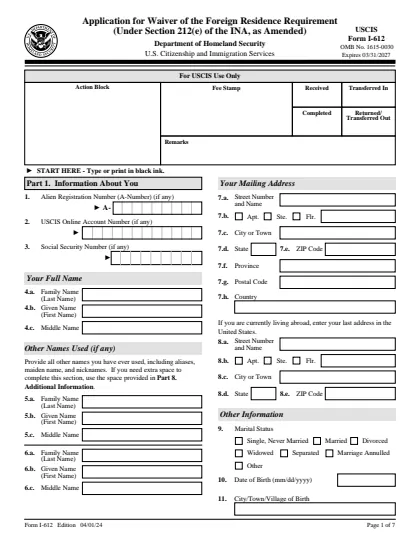
Page 1 38 fields
Part 1. Information About You. Your Full Name. 4. B. Enter Given Name (First Name). Part 1. Information About You. Your Full Name. 4. A. Enter Family Name (Last Name.) Part 1. Information About You. Other Names Used (if any). 5. C. Enter Middle Name. Part 1. Information About You. Other Names Used (if any). 5. B. Enter Given Name (First Name.) Part 1. Information About You. Other Names Used (if any). Provide other names you have used, including aliases, maiden name, and nicknames. If you need extra space to complete this section, use the space provided in Part Part 1. Information About You. Other Names Used (if any). 6. C. Enter the Middle Name. Part 1. Information About You. Other Names Used (if any). 6. B. Enter Given Name (First Name.) Part 1. Information About You. Other Names Used (if any). 6. A. Enter Family Name (Last Name.) Part 1. Information About You. Your Mailing Address. If you are currently living abroad, enter your last address in the United States. 8. A. Enter Street Number and Name. Part 1. Information About You. Your Mailing Address. 8. C. Enter City or Town. Part 1. Information About You. Your Mailing Address. 8. B. Select Suite. Part 1. Information About You. Your Mailing Address. 8. B. Select Floor. Part 1. Information About You. Your Mailing Address. 8. B. Select Apartment. Part 1. Information About You. Your Mailing Address. 8. E. Enter Zip Code. Part 1. Information About You. Your Mailing Address. 8. D. Select State from List of States. AA AE AK AL AP AR AS AZ CA CO CT DC DE FL FM GA GU HI IA ID IL IN KS KY LA MA MD ME MH MI MN MO MP MS MT NC ND NE NH NJ NM NV NY OH OK OR PA PR PW RI SC SD TN TX UT VA VI VT WA WI WV WY Part 1. Information About You. Your Mailing Address. 7. H. Enter Country. Part 1. Information About You. Your Mailing Address. 7. A. Enter Street Number and Name. Part 1. Information About You. Your Mailing Address. 7. C. Enter City or Town. Part 1. Information About You. Your Mailing Address. 7. B. Select Suite. Part 1. Information About You. Your Mailing Address. 7. B. Select Floor. Part 1. Information About You. Your Mailing Address. 7. F. Enter Province. Part 1. Information About You. Your Mailing Address. 7. G. Enter Postal Code. Part 1. Information About You. Your Mailing Address. 7. E. Enter Zip Code. Part 1. Information About You. Your Mailing Address. 7. D. Select State from List of States. AA AE AK AL AP AR AS AZ CA CO CT DC DE FL FM GA GU HI IA ID IL IN KS KY LA MA MD ME MH MI MN MO MP MS MT NC ND NE NH NJ NM NV NY OH OK OR PA PR PW RI SC SD TN TX UT VA VI VT WA WI WV WY Part 1. Information About You. Other Information. 10. Enter Date of Birth. Enter as 2 digit month, 2 digit day and 4 digit year. Part 1. Information About You. Other Information. 11. Enter City / Town / Village of Birth. Part 1. Information About You. Your Full Name. 4. C. Enter Middle Name. Part 1. Information About You. 2. Enter U S C I S Online Account Number (if any.) Part 1. Information About You. Your Mailing Address. 7. B. Select Apartment. Part 1. Information About You. 1. Enter Alien Registration Number. (A. Number) (if any). Part 1. Information About You. Other Information. 9. Marital Status. Select Single, Never Married. Part 1. Information About You. Other Information. 9. Marital Status. Select Other. Part 1. Information About You. Other Information. 9. Marital Status. Select Marriage Annulled. Part 1. Information About You. Other Information. 9. Marital Status. Select Separated. Part 1. Information About You. Other Information. 9. Marital Status. Select Widowed. Part 1. Information About You. Other Information. 9. Marital Status. Select Divorced. Part 1. Information About You. Other Information. 9. Marital Status. Select Married. Part 1. Information About You. 3. Enter U.S. Social Security Number (If any).
Page 2 16 fields
Part 1. Information About You. Other Information. 14. Enter Country of Last Foreign Residence . Part 2. Reason for Foreign Residence Requirement. I believe I am subject to the foreign residence requirement because (Select all applicable boxes). 2. A. Select An agency of the U.S. Government or the government of my c Part 2. Reason for Foreign Residence Requirement. I believe I am subject to the foreign residence requirement because (Select all applicable boxes). 1. Select I participated in an exchange program that was financed by an Part 2. Reason for Foreign Residence Requirement. I believe I am subject to the foreign residence requirement because (Select all applicable boxes). 3. Select I became an exchange visitor after the U.S. Secretary of Stat Part 2. Reason for Foreign Residence Requirement. I believe I am subject to the foreign residence requirement because (Select all applicable boxes). 4. Select I entered the United States as, or my status was changed to, Part 3. Reason for Application for Waiver of Foreign Residence Requirement. I am applying for a waiver of the foreign residence requirement because (Select only one box). 1. Select My departure from the United States wou Part 3. Reason for Application for Waiver of Foreign Residence Requirement. Information About Spouse. 3. C. Enter Middle Name. Part 3. Reason for Application for Waiver of Foreign Residence Requirement. Information About Spouse. 3. B. Enter Given Name (First Name.) Part 3. Reason for Application for Waiver of Foreign Residence Requirement. List all J-2 dependents that are included in this application. If you need extra space to complete this section, use the space provided in Part Part 3. Reason for Application for Waiver of Foreign Residence Requirement. Information About Spouse. 4. Enter Date of Birth. Enter as 2 digit month, 2 digit day and 4 digit year. Part 3. Reason for Application for Waiver of Foreign Residence Requirement. Information About Spouse. 5. Enter Country of Birth. Part 3. Reason for Application for Waiver of Foreign Residence Requirement. Information About Spouse. 7. Enter Country of Last Foreign Residence. Part 3. Reason for Application for Waiver of Foreign Residence Requirement. Information About Spouse. 6. Enter Country of Citizenship or Nationality. Part 1. Information About You. Other Information. 12. Enter Country of Birth. Part 1. Information About You. Other Information. 13. Enter Country of Citizenship or Nationality. Part 3. Reason for Application for Waiver of Foreign Residence Requirement. I am applying for a waiver of the foreign residence requirement because (Select only one box). 2. Select I cannot return to the country of my na
Page 3 36 fields
Part 3. Reason for Application for Waiver of Foreign Residence Requirement. Information About Children. 18. A. Enter Family Name (Last Name). Part 3. Reason for Application for Waiver of Foreign Residence Requirement. Information About Children. 18. B. Enter First Name (Given Name). Part 3. Reason for Application for Waiver of Foreign Residence Requirement. Information About Children. 18. C. Enter Middle Name. Part 3. Reason for Application for Waiver of Foreign Residence Requirement. Information About Children. 8. C. Enter Middle Name. Part 3. Reason for Application for Waiver of Foreign Residence Requirement. Information About Children. If you need extra space to complete this section, use the space provided in Part 8. Additional Information. 8. A. En Part 3. Reason for Application for Waiver of Foreign Residence Requirement. Information About Children. 8. B. Enter First Name (Given Name). Part 3. Reason for Application for Waiver of Foreign Residence Requirement. Information About Children. 9. Enter Date of Birth. Enter as 2 digits for the month, 2 digits for the day and 4 digits for the year. Part 3. Reason for Application for Waiver of Foreign Residence Requirement. Information About Children. 10. Enter Country of Birth. Part 3. Reason for Application for Waiver of Foreign Residence Requirement. Information About Children. 12. Enter Country of Last Foreign Residence. Part 3. Reason for Application for Waiver of Foreign Residence Requirement. Information About Children. 11. Enter Country of Citizenship or Nationality. Part 3. Reason for Application for Waiver of Foreign Residence Requirement. Information About Children. 13. C. Enter Middle Name. Part 3. Reason for Application for Waiver of Foreign Residence Requirement. Information About Children. 13. A. Enter Family Name (Last Name). Part 3. Reason for Application for Waiver of Foreign Residence Requirement. Information About Children. 13. B. Enter First Name (Given Name). Part 3. Reason for Application for Waiver of Foreign Residence Requirement. Information About Children. 15. Enter Country of Birth. Part 3. Reason for Application for Waiver of Foreign Residence Requirement. Information About Children. 14. Enter Date of Birth. Enter as 2 digits for the month, 2 digits for the day and 4 digits for the year. Part 3. Reason for Application for Waiver of Foreign Residence Requirement. Information About Children. 16. Enter Country of Citizenship or Nationality. Part 3. Reason for Application for Waiver of Foreign Residence Requirement. Information About Children. 17. Enter Country of Last Foreign Residence. Part 4. Additional Information About You. If you need extra space to complete this section, use the space provided in Part 8. Additional Information. 1. Provide all exchange program numbers and names or all exchange prog Part 4. Additional Information About You. Major field of activity (Select only one box). 2. A. Select Agriculture. Part 4. Additional Information About You. Major field of activity (Select only one box). 2. B. Select Business Administration. Part 4. Additional Information About You. Major field of activity (Select only one box). 2. C. Select Education. Part 4. Additional Information About You. Major field of activity (Select only one box). 2. F. Select Medicine. Part 4. Additional Information About You. Major field of activity (Select only one box). 2. D. Select Engineering. Part 4. Additional Information About You. Major field of activity (Select only one box). 2. E. Select Humanities. Part 4. Additional Information About You. Major field of activity (Select only one box). 2. G. Select Natural and Physical Sciences. Part 4. Additional Information About You. Major field of activity (Select only one box). 2. H. Select Social Sciences. Part 4. Additional Information About You. Major field of activity (Select only one box). 2. I. Select Other. Part 4. Additional Information About You. 4. Enter Date of last entry into the United States as a J-1 participant in a designated exchange program. Enter as 2 digit month, 2 digit day and 4 digit year. Part 4. Additional Information About You. 6. If you are now abroad, enter the date of your most recent departure from the United States. Enter as 2 digit month, 2 digit day and 4 digit year. Part 4. Additional Information About You. 3. Enter Occupation. Part 4. Additional Information About You. 5. Port-of-Entry (P O E) of last arrival in the United States as a participant in a designated exchange program. Enter City or Town. Part 4. Additional Information About You. 5. Port-of-Entry (P O E) of last arrival in the United States as a participant in a designated exchange program. Select State from List of States. AA AE AK AL AP AR AS AZ CA CO CT DC DE FL FM GA GU HI IA ID IL IN KS KY LA MA MD ME MH MI MN MO MP MS MT NC ND NE NH NJ NM NV NY OH OK OR PA PR PW RI SC SD TN TX UT VA VI VT WA WI WV WY Part 3. Reason for Application for Waiver of Foreign Residence Requirement. Information About Children. 20. Enter Country of Birth. Part 3. Reason for Application for Waiver of Foreign Residence Requirement. Information About Children. 19. Enter Date of Birth. Enter as 2 digits for the month, 2 digits for the day and 4 digits for the year. Part 3. Reason for Application for Waiver of Foreign Residence Requirement. Information About Children. 21. Enter Country of Citizenship or Nationality. Part 3. Reason for Application for Waiver of Foreign Residence Requirement. Information About Children. 22. Enter Country of Last Foreign Residence.
Page 4 17 fields
Part 4. Additional Information About You. Other Information About Lawful Permanent Spouse or Child. 22. Enter Basis (preference category) for adjusting to lawful permanent resident status (for example, F-2. A., Spouse or Part 4. Additional Information About You. Other Information About Lawful Permanent Spouse or Child. 20. Enter Date of adjustment to lawful permanent resident status. Enter as 2 digit month, 2 digit day and 4 digit year. Part 4. Additional Information About You. Other Information About Lawful Permanent Spouse or Child. 21. Location where your spouse or child became a lawful permanent resident. Enter City or Town. Part 4. Additional Information About You. Other Information About Lawful Permanent Spouse or Child. 21. Location where your spouse or child became a lawful permanent resident. Select State from List of States. AA AE AK AL AP AR AS AZ CA CO CT DC DE FL FM GA GU HI IA ID IL IN KS KY LA MA MD ME MH MI MN MO MP MS MT NC ND NE NH NJ NM NV NY OH OK OR PA PR PW RI SC SD TN TX UT VA VI VT WA WI WV WY Part 4. Additional Information About You. If you are married, select only one box. 7. A. Select My spouse is included in this application. Part 4. Additional Information About You. If you are married, select only one box. 7. B. Select My spouse is filing a separate application for a waiver of the foreign residence requirement. Part 4. Additional Information About You. If you are married, select only one box. 7. C. Select My spouse is not included in this application. Part 4. Additional Information About You. If you selected Part 3., Item Number 1., provide the following information about your U.S. citizen spouse or children who you believe would suffer exceptional hardship if you res Part 4. Additional Information About You. 8. B. Enter Given Name (First Name.) Part 4. Additional Information About You. 8. C. Enter Middle Name. Part 4. Additional Information About You. U.S. citizenship of spouse or child was acquired through (Select only one box). 9. A. Select Birth in the United States. Part 4. Additional Information About You. U.S. citizenship of spouse or child was acquired through (Select only one box). 9. B. Select Naturalization. Part 4. Additional Information About You. U.S. citizenship of spouse or child was acquired through (Select only one box). 9. C. Select Parents. Part 4. Additional Information About You. Name of the lawful permanent resident spouse or child. 18. C. Enter Middle Name. Part 4. Additional Information About You. Name of the lawful permanent resident spouse or child. 18. B. Enter Given Name (First Name.) Part 4. Additional Information About You. If you answered “No” to Item Number 13., submit evidence in accordance with the What Evidence Must You Submit section of the Instructions. If you selected Part 3., Item Number 1. Part 4. Additional Information About You. Other Information About Lawful Permanent Spouse or Child. 19. Enter Alien Registration Number (A. Number) (if any).
Page 5 23 fields
Part 5. Applicant's Statement, Contact Information, Declaration, Certification, and Signature. Applicant's Statement. 1. B. Select The interpreter named in Part 6. read to me every question and instruction on this applic Part 5. Applicant's Statement, Contact Information, Declaration, Certification, and Signature. NOTE: Read the Penalties section of the Form I-6 12 Instructions before completing this part. Applicant's Statement. NOTE: Se Part 5. Applicant's Statement, Contact Information, Declaration, Certification, and Signature. Applicant's Statement. 2. Select At my request, the preparer named in Part 7., prepared this application for me based only up Part 5. Applicant's Statement, Contact Information, Declaration, Certification, and Signature. Applicant's Contact Information. 3. Enter Applicant's Daytime Telephone Number. Part 5. Applicant's Statement, Contact Information, Declaration, Certification, and Signature. Applicant's Contact Information. 5. Enter Applicant's Email Address (if any). Part 5. Applicant's Statement, Contact Information, Declaration, Certification, and Signature. Applicant's Contact Information. 4. Enter Applicant's Mobile Telephone Number (if any). Part 5. Applicant's Statement, Contact Information, Declaration, Certification, and Signature. Applicant's Signature. 6. B. Enter Date of Signature. Enter as 2 digit month, 2 digit day and 4 digit year. Part 6. Interpreter's Contact Information, Certification, and Signature. Provide the following information about the interpreter. Interpreter's Full Name. 1. A. Enter Interpreter's Family Name (Last Name.) Part 6. Interpreter's Contact Information, Certification, and Signature. Interpreter's Full Name. 1. B. Enter Interpreter's Given Name (First Name). Part 6. Interpreter's Contact Information, Certification, and Signature. Interpreter's Full Name. 2. Enter Interpreter's Business or Organization Name (if any). Part 6. Interpreter's Contact Information, Certification, and Signature. Interpreter's Mailing Address. 3. C. Enter City or Town. Part 6. Interpreter's Contact Information, Certification, and Signature. Interpreter's Mailing Address. 3. A. Enter Street Number and Name. Part 6. Interpreter's Contact Information, Certification, and Signature. Interpreter's Mailing Address. 3. B. Select Suite. Part 6. Interpreter's Contact Information, Certification, and Signature. Interpreter's Mailing Address. 3. B. Select Floor. Part 6. Interpreter's Contact Information, Certification, and Signature. Interpreter's Mailing Address. 3. B. Select Apartment. Part 6. Interpreter's Contact Information, Certification, and Signature. Interpreter's Mailing Address. 3. F. Enter Province. Part 6. Interpreter's Contact Information, Certification, and Signature. Interpreter's Mailing Address. 3. E. Enter Zip Code. Part 6. Interpreter's Contact Information, Certification, and Signature. Interpreter's Mailing Address. 3. D. Select State from List of States. AA AE AK AL AP AR AS AZ CA CO CT DC DE FL FM GA GU HI IA ID IL IN KS KY LA MA MD ME MH MI MN MO MP MS MT NC ND NE NH NJ NM NV NY OH OK OR PA PR PW RI SC SD TN TX UT VA VI VT WA WI WV WY Part 6. Interpreter's Contact Information, Certification, and Signature. Interpreter's Mailing Address. 3. H. Enter Country. Part 6. Interpreter's Contact Information, Certification, and Signature. Interpreter's Mailing Address. 3. G. Enter Postal Code. Part 6. Interpreter's Contact Information, Certification, and Signature. Interpreter's Contact Information. 4. Enter Interpreter's Daytime Telephone Number. Part 6. Interpreter's Contact Information, Certification, and Signature. Interpreter's Contact Information. 6. Enter Interpreter's Email Address (if any.) Part 6. Interpreter's Contact Information, Certification, and Signature. Interpreter's Contact Information. 5. Enter Interpreter's Mobile Telephone Number (if any).
Page 6 21 fields
Part 6. Interpreter's Contact Information, Certification, and Signature. Interpreter's Signature. 6. B. Enter Date of Signature. Enter as 2 digit month, 2 digit day and 4 digit year. Part 6. Interpreter's Contact Information, Certification, and Signature. Interpreter's Certification. I certify, under penalty of perjury, that I am fluent in English and (Enter Language), which is the same language spec Part 7. Contact Information, Declaration, and Signature of the Person Preparing this Application, if Other Than the Applicant. Preparer's Full Name. 2. Enter Preparer's Business or Organization Name (if any). Part 7. Contact Information, Declaration, and Signature of the Person Preparing this Application, if Other Than the Applicant. Provide the following information about the preparer. Preparer's Full Name. 1. A. Enter Prepa Part 7. Contact Information, Declaration, and Signature of the Person Preparing this Application, if Other Than the Applicant. Preparer's Full Name. 1. B. Enter Preparer's Given Name (First Name.) Part 7. Contact Information, Declaration, and Signature of the Person Preparing this Application, if Other Than the Applicant. Preparer's Contact Information. 6. Enter Preparer's Email address (if any). Part 7. Contact Information, Declaration, and Signature of the Person Preparing this Application, if Other Than the Applicant. Preparer's Contact Information. 4. Enter Preparer's Daytime Telephone Number. Part 7. Contact Information, Declaration, and Signature of the Person Preparing this Application, if Other Than the Applicant. Preparer's Contact Information. 5. Enter Preparer's Mobile Telephone Number (if any.) Part 7. Contact Information, Declaration, and Signature of the Person Preparing this Application, if Other Than the Applicant. Preparer's Statement. 7. A. Select I am not an attorney or accredited representative but have Part 7. Contact Information, Declaration, and Signature of the Person Preparing this Application, if Other Than the Applicant. Preparer's Statement. 7. B. Select I am an attorney or accredited representative. NOTE: If yo Part 7. Contact Information, Declaration, and Signature of the Person Preparing this Application, if Other Than the Applicant. Preparer's Mailing Address. 3. C. Enter City or Town. Part 7. Contact Information, Declaration, and Signature of the Person Preparing this Application, if Other Than the Applicant. Preparer's Mailing Address. 3. A. Enter Street Number and Name. Part 7. Contact Information, Declaration, and Signature of the Person Preparing this Application, if Other Than the Applicant. Preparer's Mailing Address. 3. B. Select Suite. Part 7. Contact Information, Declaration, and Signature of the Person Preparing this Application, if Other Than the Applicant. Preparer's Mailing Address. 3. B. Select Floor. Part 7. Contact Information, Declaration, and Signature of the Person Preparing this Application, if Other Than the Applicant. Preparer's Mailing Address. 3. B. Select Apartment. Part 7. Contact Information, Declaration, and Signature of the Person Preparing this Application, if Other Than the Applicant. Preparer's Mailing Address. 3. F. Enter Province. Part 7. Contact Information, Declaration, and Signature of the Person Preparing this Application, if Other Than the Applicant. Preparer's Mailing Address. 3. E. Enter Zip Code. Part 7. Contact Information, Declaration, and Signature of the Person Preparing this Application, if Other Than the Applicant. Preparer's Mailing Address. 3. D. Select State from List of States. AA AE AK AL AP AR AS AZ CA CO CT DC DE FL FM GA GU HI IA ID IL IN KS KY LA MA MD ME MH MI MN MO MP MS MT NC ND NE NH NJ NM NV NY OH OK OR PA PR PW RI SC SD TN TX UT UT VA VI VT WA WI WV WY Part 7. Contact Information, Declaration, and Signature of the Person Preparing this Application, if Other Than the Applicant. Preparer's Mailing Address. 3. H. Enter Country. Part 7. Contact Information, Declaration, and Signature of the Person Preparing this Application, if Other Than the Applicant. Preparer's Mailing Address. 3. G. Enter Postal Code. Part 7. Contact Information, Declaration, and Signature of the Person Preparing this Application, if Other Than the Applicant. Preparer's Signature. 8. B. Enter Date of Signature. Enter as 2 digit month, 2 digit day and
Page 7 20 fields
Part 8. Additional Information. 3. D. Enter Additional Information. Part 8. Additional Information. 3. A. Enter Page Number. Part 8. Additional Information. 3. B. Enter Part Number. Part 8. Additional Information. 3. C. Enter Item Number. Part 8. Additional Information. 4. D. Enter Additional Information. Part 8. Additional Information. 4. A. Enter Page Number. Part 8. Additional Information. 4. B. Enter Part Number. Part 8. Additional Information. 4. C. Enter Item Number. Part 8. Additional Information. 5. D. Enter Additional Information. Part 8. Additional Information. 5. A. Enter Page Number. Part 8. Additional Information. 5. B. Enter Part Number. Part 8. Additional Information. 5. C. Enter Item Number. Part 8. Additional Information. 6. D. Enter Additional Information. Part 8. Additional Information. 7. C. Enter Item Number. Part 8. Additional Information. 7. B. Enter Part Number. Part 8. Additional Information. 7. A. Enter Page Number. Part 8. Additional Information. 7. D. Enter Additional Information. Part 8. Additional Information. 6. A. Enter Page Number. Part 8. Additional Information. 6. B. Enter Part Number. Part 8. Additional Information. 6. C. Enter Item Number.