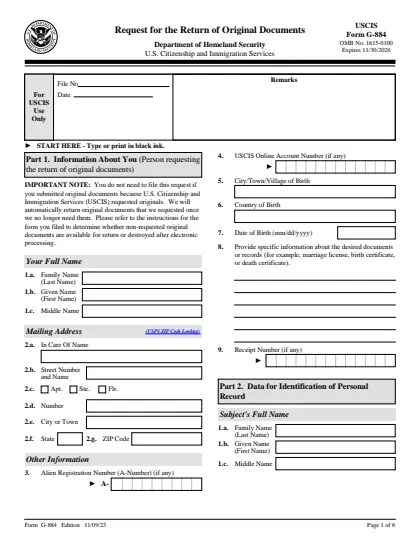
Page 1 21 fields
Part 1. Information About You (Person requesting the return of original documents). 1.A. Enter Family Name (Last Name). Part 1. Information About You (Person requesting the return of original documents). 1.B. Enter Given Name (First Name). Part 1. Information About You (Person requesting the return of original documents). 1.C. Enter Middle Name. Part 1. Information About You. Mailing Address. 2.A. Enter In Care of Name. Part 1. Information About You. Mailing Address. 2.B. Enter Street Number and Name. Part 1. Information About You. Mailing Address. 2.C. Check Suite. Part 1. Information About You. Mailing Address. 2.C. Check Floor. Part 1. Information About You. Mailing Address. 2.C. Check Apartment. Part 1. Information About You. Mailing Address. 2.E. Enter City or Town. Part 1. Information About You. Mailing Address. 2.G. Enter Zip Code. Part 1. Information About You. Mailing Address. 2.F. Select State from a list of States. AA AE AK AL AP AR AS AZ CA CO CT DC DE FL FM GA GU HI IA ID IL IN KS KY LA MA MD ME MH MI MN MO MP MS MT NC ND NE NH NJ NM NV NY OH OK OR PA PR PW RI SC SD TN TX UT VA VI VT WA WI WV WY Part 1. Information About You. 3. Enter Alien Registration Number (A-Number), if any. Part 1. Information About You. Other Information. 5. Enter City/Town/Village of Birth. Part 1. Information About You. Other Information. 6. Enter Country of Birth. Part 1. Information About You. 7. Enter Date of Birth as 2-digit Month, 2-digit Day, and 4-digit Year. Part 1. Information About You. 8. Provide specific information about the desired documents or records (for example, marriage license, birth certificate, or death certificate). Part 1. Information About You. 9. Enter U S C I S Receipt Number. Part 2. Data for Identification of Personal Record. Subject's Full Name. 1.A. Enter Family Name (Last Name). Part 2. Data for Identification of Personal Record. Subject's Full Name. 1.B. Enter Given Name (First Name). Part 2. Data for Identification of Personal Record. Subject's Full Name. 1.C. Enter Middle Name. Part 1. Information About You. 4. Enter U S C I S Electronic Immigration System (E L I S) Account Number, if any.
Page 2 29 fields
Part 2. Data for Identification of Personal Record. Other Names Used (if any). 2.A. Enter Family Name (Last Name). Part 2. Data for Identification of Personal Record. Other Names Used (if any). 2.B. Enter Given Name (First Name). Part 2. Data for Identification of Personal Record. Other Names Used (if any). 2.C. Enter Middle Name. Part 2. Data for Identification of Personal Record. Other Names Used (if any). 3.A. Enter Family Name (Last Name). Part 2. Data for Identification of Personal Record. Other Names Used (if any). 3.B. Enter Given Name (First Name). Part 2. Data for Identification of Personal Record. Other Names Used (if any). 3.C. Enter Middle Name. Part 2. Data for Identification of Personal Record. Birth Information. 4. Enter Date of Birth. Enter as 2 digit month, 2 digit day and 4 digit year. Part 2. Data for Identification of Personal Record. Birth Information. Place of Birth. 5.B. Enter State or Province. Part 2. Data for Identification of Personal Record. Birth Information. Place of Birth. 5.A. Enter City or Town. Part 2. Data for Identification of Personal Record. Birth Information. Place of Birth. 5.C. Enter Country. Part 2. Data for Identification of Personal Record. Entry Into the United States. 6. Enter Date of Entry. Enter as 2 digit month, 2 digit day and 4 digit year. Part 2. Data for Identification of Personal Record. Entry Into the United States. 7. Enter Port-of-Entry. Part 2. Data for Identification of Personal Record. Entry Into the United States. 8. Enter Type of Entry (for example, visitor, student, etc.). Part 2. Data for Identification of Personal Record. Entry Into the United States. 9. Enter Alien Registration Number (A. Number), if any. Part 2. Data for Identification of Personal Record. U.S. Citizenship Information. Name on Certificate of Naturalization. 10.A. Enter Family Name (Last Name). Part 2. Data for Identification of Personal Record. U.S. Citizenship Information. Name on Certificate of Naturalization. 10.B. Enter Given Name (First Name). Part 2. Data for Identification of Personal Record. U.S. Citizenship Information. Name on Certificate of Naturalization. 10.C. Enter Middle Name. Part 2. Data for Identification of Personal Record. U.S. Citizenship Information. 11. Enter Certificate of Naturalization Number. Part 2. Data for Identification of Personal Record. U.S. Citizenship Information. 12. Enter Certificate of Naturalization Date. Enter as 2 digit month, 2 digit day and 4 digit year. Part 2. Data for Identification of Personal Record. Name on Certificate of Citizenship. 13.A. Enter Family Name (Last Name). Part 2. Data for Identification of Personal Record. Name on Certificate of Citizenship. 13.B. Enter Given Name (First Name). Part 2. Data for Identification of Personal Record. Name on Certificate of Citizenship. 13.C. Enter Middle Name. Part 2. Data for Identification of Personal Record. 14. Enter Certificate of Citizenship Number. Part 2. Data for Identification of Personal Record. 15. Enter Certificate of Citizenship Date. Enter as 2 digit month, 2 digit day and 4 digit year. Part 2. Data for Identification of Personal Record. Naturalization Court/USCIS Office and Location. 16.A. Enter Naturalization Court / U S C I S Office and Location. Part 2. Data for Identification of Personal Record. Naturalization Court/USCIS Office and Location. 16.C. Enter City or Town. Part 2. Data for Identification of Personal Record. Naturalization Court/USCIS Office and Location. 16.C. Select State from List of States. AA AE AK AL AP AR AS AZ CA CO CT DC DE FL FM GA GU HI IA ID IL IN KS KY LA MA MD ME MH MI MN MO MP MS MT NC ND NE NH NJ NM NV NY OH OK OR PA PR PW RI SC SD TN TX UT VA VI VT WA WI WV WY Part 2. Data for Identification of Personal Record. 17. Verification of Requester's Identity. Select In Person With Identification. Part 2. Data for Identification of Personal Record. 17. Verification of Requester's Identity. Select Legal Photocopies.
Page 3 34 fields
Part 3. Interpreter's Contact Information, Certification, and Signature. Provide the following information about the interpreter. Interpreter's Full Name. 1. A. Enter Interpreter's Family Name (Last Name). Part 3. Interpreter's Contact Information, Certification, and Signature. Provide the following information about the interpreter. Interpreter's Full Name. 2. Enter Interpreter's Business or Organization Name, if any. Part 3. Interpreter's Contact Information, Certification, and Signature. Provide the following information about the interpreter. Interpreter's Full Name. 1. B. Enter Interpreter's Given Name (First Name). Part 3. Interpreter's Contact Information, Certification, and Signature. Interpreter's Mailing Address. 3. C. Enter City or Town. Part 3. Interpreter's Contact Information, Certification, and Signature. Interpreter's Mailing Address. 3. A. Enter Street Number and Name. Part 3. Interpreter's Contact Information, Certification, and Signature. Interpreter's Mailing Address. 3. B. Select Suite. Part 3. Interpreter's Contact Information, Certification, and Signature. Interpreter's Mailing Address. 3. B. Select Floor. Part 3. Interpreter's Contact Information, Certification, and Signature. Interpreter's Mailing Address. 3. B. Select Apartment. Part 3. Interpreter's Contact Information, Certification, and Signature. Interpreter's Mailing Address. 3. E. Enter ZIP Code. Part 3. Interpreter's Contact Information, Certification, and Signature. Interpreter's Mailing Address. 3. D. Select State from List of States. AA AE AK AL AP AR AS AZ CA CO CT DC DE FL FM GA GU HI IA ID IL IN KS KY LA MA MD ME MH MI MN MO MP MS MT NC ND NE NH NJ NM NV NY OH OK OR PA PR PW RI SC SD TN TX UT VA VI VT WA WI WV WY Part 3. Interpreter's Contact Information, Certification, and Signature. Interpreter's Mailing Address. 3. F. Enter Province. Part 3. Interpreter's Contact Information, Certification, and Signature. Interpreter's Mailing Address. 3. G. Enter Postal Code. Part 3. Interpreter's Contact Information, Certification, and Signature. Interpreter's Mailing Address. 3. H. Enter Country. Part 3. Interpreter's Contact Information, Certification, and Signature. Interpreter's Contact Information. 4. Enter Interpreter's Daytime Telephone Number. Part 3. Interpreter's Contact Information, Certification, and Signature. Interpreter's Contact Information. 6. Enter Interpreter's Email Address, if any. Part 3. Interpreter's Contact Information, Certification, and Signature. Interpreter's Contact Information. 5. Enter Interpreter's Mobile Telephone Number (if any). Part 3. Interpreter's Contact Information, Certification, and Signature. Interpreter's Signature. 7.B. Enter Date of Signature. Enter as 2-digit Month, 2-digit Day, and 4-digit Year. Part 4. Contact Information, Declaration, and Signature of the Person Preparing this Request, if Other Than the Requestor. Provide the following information about the preparer. Preparer's Full Name. 1. A. Enter Preparer' Part 4. Contact Information, Declaration, and Signature of the Person Preparing this Request, if Other Than the Requestor. Provide the following information about the preparer. Preparer's Full Name. 1. B. Enter Preparer' Part 4. Contact Information, Declaration, and Signature of the Person Preparing this Request, if Other Than the Requestor. Provide the following information about the preparer. Preparer's Full Name. 2. Enter Preparer's B Part 4. Contact Information, Declaration, and Signature of the Person Preparing this Request, if Other Than the Requestor. Preparer's Mailing Address. 3. C. Enter City or Town. Part 4. Contact Information, Declaration, and Signature of the Person Preparing this Request, if Other Than the Requestor. Preparer's Mailing Address. 3. A. Enter Street Number and Name. Part 4. Contact Information, Declaration, and Signature of the Person Preparing this Request, if Other Than the Requestor. Preparer's Mailing Address. 3. B. Select Suite. Part 4. Contact Information, Declaration, and Signature of the Person Preparing this Request, if Other Than the Requestor. Preparer's Mailing Address. 3. B. Select Floor. Part 4. Contact Information, Declaration, and Signature of the Person Preparing this Request, if Other Than the Requestor. Preparer's Mailing Address. 3. B. Select Apartment. Part 4. Contact Information, Declaration, and Signature of the Person Preparing this Request, if Other Than the Requestor. Preparer's Mailing Address. 3. E. Enter Zip Code. Part 4. Contact Information, Declaration, and Signature of the Person Preparing this Request, if Other Than the Requestor. Preparer's Mailing Address. 3. D. Select State from List of States. AA AE AK AL AP AR AS AZ CA CO CT DC DE FL FM GA GU HI IA ID IL IN KS KY LA MA MD ME MH MI MN MO MP MS MT NC ND NE NH NJ NM NV NY OH OK OR PA PR PW RI SC SD TN TX UT VA VI VT WA WI WV WY Part 4. Contact Information, Declaration, and Signature of the Person Preparing this Request, if Other Than the Requestor. Preparer's Mailing Address. 3. F. Enter Province. Part 4. Contact Information, Declaration, and Signature of the Person Preparing this Request, if Other Than the Requestor. Preparer's Mailing Address. 3. G. Enter Postal Code. Part 4. Contact Information, Declaration, and Signature of the Person Preparing this Request, if Other Than the Requestor. Preparer's Mailing Address. 3. H. Enter Country. Part 3. Interpreter's Contact Information, Certification, and Signature. Interpreter's Certification. I certify, under penalty or perjury, that: I am fluent in English and the same language specified in Part 5., Item Num Part 4. Contact Information, Declaration, and Signature of the Person Preparing this Request, if Other Than the Requestor. Preparer's Contact Information. 6. Enter Preparer's Email Address (if any). Part 4. Contact Information, Declaration, and Signature of the Person Preparing this Request, if Other Than the Requestor. Preparer's Contact Information. 5. Enter Preparer's Mobile Telephone Number (if any). Part 4. Contact Information, Declaration, and Signature of the Person Preparing this Request, if Other Than the Requestor. Preparer's Contact Information. 4. Enter Preparer's Daytime Telephone Number.
Page 4 9 fields
Part 4. Contact Information, Declaration, and Signature of the Person Preparing this Request, if Other Than the Requestor. Preparer's Statement. Select 7. A. I am not an attorney or accredited representative but have pre Part 4. Contact Information, Declaration, and Signature of the Person Preparing this Request, if Other Than the Requestor. Preparer's Statement. Select 7. B. I am an attorney or accredited representative and my represent Part 4. Contact Information, Declaration, and Signature of the Person Preparing this Request, if Other Than the Requestor. . Preparer's Signature. 8.B. Enter Date of of Signature. Enter as 2-digit Month, 2-digit Day, and Part 5. Requestor's Declaration, Certification, Signature, and Affidavit of Identity. NOTE: Select the box for either Item Number 1.A. or 1.B. If applicable, select the box for Item Number 2. 1.A. Check I can read and un Part 5. Requestor's Declaration, Certification, Signature, and Affidavit of Identity. NOTE: Select the box for either Item Number 1.A. or 1.B. If applicable, select the box for Item Number 2. 1.B. The interpreter named i Part 5. Requestor's Declaration, Certification, Signature, and Affidavit of Identity. NOTE: Select the box for either Item Number 1.A. or 1.B. If applicable, select the box for Item Number 2. 2. At my request, the prepar Part 5. Requestor's Declaration, Certification, Signature, and Affidavit of Identity. Requestor's Contact Information. 5. Enter Requestor's Email Address, if any. Part 5. Requestor's Declaration, Certification, Signature, and Affidavit of Identity. Requestor's Contact Information. 3. Enter Requestor's Daytime Telephone Number. Part 5. Requestor's Declaration, Certification, Signature, and Affidavit of Identity. Requestor's Contact Information. 4. Enter Requestor's Mobile Telephone Number, if any.
Page 5 14 fields
Part 5. Requestor's Declaration, Certification, Signature, and Affidavit of Identity. Requestor's Printed Full Name. 6.C. Enter Middle Name. Part 5. Requestor's Declaration, Certification, Signature, and Affidavit of Identity. Requestor's Printed Full Name. 6.B. Enter Given Name or (First Name). Part 5. Requestor's Declaration, Certification, Signature, and Affidavit of Identity. Requestor's Printed Full Name. 6.A. Enter Family Name (Last Name). Part 5. Signature of Attorney or Accredited Representative. 3. Enter Date of Signature as 2-digit Month, 2-digit Day, and 4-digit Year. Part 5. Requestor's Declaration, Certification, Signature, and Affidavit of Identity. Printed Name of USCIS Official. 8.C. Enter Middle Name. Part 5. Requestor's Declaration, Certification, Signature, and Affidavit of Identity. Printed Name of USCIS Official. 8.B. Enter Given Name or (First Name). Part 5. Requestor's Declaration, Certification, Signature, and Affidavit of Identity. Printed Name of USCIS Official. 8.A. Enter Family Name (Last Name). Part 5. Requestor's Declaration, Certification, Signature, and Affidavit of Identity. 9. Enter Title of USCIS Official. Part 5. Requestor's Declaration, Certification, Signature, and Affidavit of Identity. 10.B. Enter Date of Signature as 2-digit Month, 2-digit Day, and 4-digit Year. Part 5. Requestor's Declaration, Certification, Signature, and Affidavit of Identity. Certifying Official. Printed Name of Certifying Official. 11.C. Enter Middle Name. Part 5. Requestor's Declaration, Certification, Signature, and Affidavit of Identity. Certifying Official. Printed Name of Certifying Official. 11.B. Enter Given Name or (First Name). Part 5. Requestor's Declaration, Certification, Signature, and Affidavit of Identity. Certifying Official. Printed Name of Certifying Official. 11.A. Enter Family Name (Last Name). Part 5. Requestor's Declaration, Certification, Signature, and Affidavit of Identity. Certifying Official. 12.B. Enter Date of Signature as 2-digit Month, 2-digit Day, and 4-digit Year. Part 5. Requestor's Declaration, Certification, Signature, and Affidavit of Identity. Certifying Official. 13. Enter In and for the.
Page 6 21 fields
Part 6. Additional Information. 2. A-Number if any. This field is pre-populated from Part 3. Part 7. Additional Information. 5. A. Enter Page Number. Part 7. Additional Information. 5. B. Enter Part Number. Part 7. Additional Information. 5. C. Enter Item Number. Part 7. Additional Information. 6. A. Enter Page Number. Part 7. Additional Information. 6. B. Enter Part Number. Part 7. Additional Information. 6. C. Enter Item Number. Part 7. Additional Information. 7. A. Enter Page Number. Part 7. Additional Information. 7. B. Enter Part Number. Part 7. Additional Information. 7. C. Enter Item Number. Part 7. Additional Information. 3. A. Enter Page Number. Part 7. Additional Information. 3. B. Enter Part Number. Part 7. Additional Information. 3. C. Enter Item Number. Part 7. Additional Information. 3. D. Enter Additional Information. Part 7. Additional Information. 4. A. Enter Page Number. Part 7. Additional Information. 4. B. Enter Part Number. Part 7. Additional Information. 4. C. Enter Item Number. Part 7. Additional Information. 4. D. Enter Additional Information. Part 7. Additional Information. 3. D. Enter Additional Information. (2) Part 7. Additional Information. 3. D. Enter Additional Information. (3) Part 7. Additional Information. 3. D. Enter Additional Information. (4)