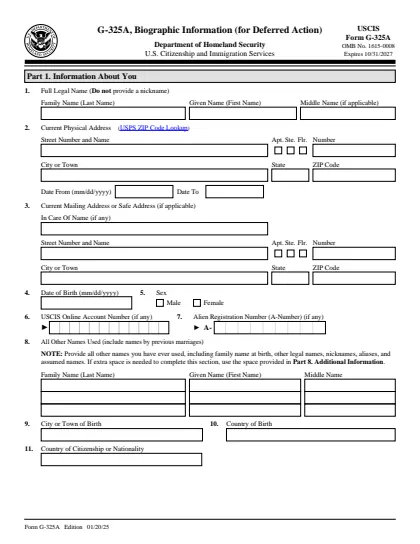
Page 1 38 fields
Part 1. Information About You. 1.Full Legal Name (Do not provide a nickname). Enter Middle Name (if applicable). Part 1. Information About You. 1.Full Legal Name (Do not provide a nickname). Enter Given Name (First Name). Part 1. Information About You. 1.Full Legal Name (Do not provide a nickname). Enter Family Name (Last Name). Part 1. Information About You. 2. Current Physical Address. Enter the City or Town. Part 1. Information About You. 2. Current Physical Address. Enter the ZIP Code. Part 1. Information About You. 2. Current Physical Address. Select a State from the list of States. AA AE AK AL AP AR AS AZ CA CO CT DC DE FL FM GA GU HI IA ID IL IN KS KY LA MA MD ME MH MI MN MO MP MS MT NC ND NE NH NJ NM NV NY OH OK OR PA PR PW RI SC SD TN TX UT VA VI VT WA WI WV WY Part 1. Information About You. 2. Current Physical Address. Enter the Street Number and Name. Part 1. Information About You. 2. Current Physical Address. Select for Suite. Part 1. Information About You. 2. Current Physical Address. Select for Apartment. Part 1. Information About You. 2. Current Physical Address. Select for Floor. Part 1. Information About You. 2. Current Physical Address. Enter an Apartment, Suite, or Floor number. Part 1. Information About You. 2. Current Physical Address. Length of residence. Enter the Date from. Enter the Date as a 2-digit month, 2-digit day, and 4-digit year. Part 1. Information About You. 4. Enter the Date of Birth. Enter the Date as a 2-digit month, 2-digit day, and 4-digit year. Part 1. Information About You. 5. Sex. Select for Male. Part 1. Information About You. . 5. Sex. Select for Female. Part 1. Information About You. 7. Enter a 9-digit Alien Registration Number (A Number), if any. Part 1. Information About You. 8. All Other Names Used (include names by previous marriages). Row 2. Enter the Middle Name. Part 1. Information About You. 8. All Other Names Used (include names by previous marriages). Row 3. Enter the Family Name (Last Name). Part 1. Information About You. 8. All Other Names Used (include names by previous marriages). Row 3. Enter the Given Name (First Name). Part 1. Information About You. 8. All Other Names Used (include names by previous marriages). Row 3. Enter the Middle Name. Part 1. Information About You. 8. All Other Names Used (include names by previous marriages). Row 2. Enter the Given Name (First Name). Part 1. Information About You. 8. All Other Names Used (include names by previous marriages). Row 2. Enter the Family Name (Last Name). Part 1. Information About You. 8. All Other Names Used (include names by previous marriages). Row 1. Enter the Middle Name. Part 1. Information About You. 8. All Other Names Used (include names by previous marriages). Row 1. Enter the Given Name (First Name). Part 1. Information About You. 8. All Other Names Used (include names by previous marriages). Row 1. Enter the Family Name (Last Name). Part 1. Information About You. 3. Current Mailing Address or Safe Address if applicable. Enter the City or Town. Part 1. Information About You. 3. Current Mailing Address of Safe Address, if applicable. Enter the ZIP Code. Part 1. Information About You. 3. Current Mailing Address of Safe Address, if applicable. Select the State form the list of States. AA AE AK AL AP AR AS AZ CA CO CT DC DE FL FM GA GU HI IA ID IL IN KS KY LA MA MD ME MH MI MN MO MP MS MT NC ND NE NH NJ NM NV NY OH OK OR PA PR PW RI SC SD TN TX UT VA VI VT WA WI WV WY Part 1. Information About You. 3. Current Mailing Address or Safe Address, If applicable. Enter the Street Number and Name. Part 1. Information About You. 3. Current Mailing Address or Safe Address, if applicable. Select for Suite. Part 1. Information About You. 3. Current Mailing Address or Safe Address, if applicable. Select for Apartment. Part 1. Information About You. 3. Current Mailing Address or Safe Address, if applicable. Select for Floor. Part 1. Information About You. 3. Current Mailing Address or Safe Address, if applicable. Enter an Apartment, Suite or Floor number. Part 1. Information About You. 3. Current Mailing Address or Safe Address, If applicable. Enter an In Care of Name, (if any). Part 2. Information About You. 6. Enter U S C I S Online Account Number, if any. Part 1. Information About You. 10. Enter the Country of Citizenship or Nationality. Part 1. Information About You. 9. Enter the City and Country of Birth. Part 1. Information About You. 11. Enter the Country of Citizenship or Nationality.
Page 2 51 fields
Part 1. Information About You. Your Prior Residences. 12. List your previous addresses for the last five years excluding your current physical address. Row 1. Enter the Street Name and Number. Part 1. Information About You. Your Prior Residences. 12. List your previous addresses for the last five years excluding your current physical address. Row 1. Enter the City. Part 1. Information About You. Your Prior Residences. 12. List your previous addresses for the last five years excluding your current physical address. Row 1. For International Address enter the Province. For U.S. Addres Part 1. Information About You. Your Prior Residences. 12. List your previous addresses for the last five years excluding your current physical address. Row 1. For International Address enter the Postal Code. For U.S. Add Part 1. Information About You. Your Prior Residences. 12. List your previous addresses for the last five years excluding your current physical address. Row 1. Enter the Country. Part 1. Information About You. Your Prior Residences. 12. List your previous addresses for the last five years excluding your current physical address. Row 1. Enter the date residence began. Enter the Date as a 2-digit m Part 1. Information About You. Your Prior Residences. 12. List your previous addresses for the last five years excluding your current physical address. Row 1. Enter the date residence ended. Enter the Date as a 2-digit m Part 1. Information About You. Your Prior Residences. 12. List your previous addresses for the last five years excluding your current physical address. Row 2. Enter the Street Name and Number. Part 1. Information About You. Your Prior Residences. 12. List your previous addresses for the last five years excluding your current physical address. Row 2. Enter the City. Part 1. Information About You. Your Prior Residences. 12. List your previous addresses for the last five years excluding your current physical address. Row 2. For International Address enter the Province. For U.S. Addres Part 1. Information About You. Your Prior Residences. 12. List your previous addresses for the last five years excluding your current physical address. Row 2. For International Address enter the Postal Code. For U.S. Add Part 1. Information About You. Your Prior Residences. 12. List your previous addresses for the last five years excluding your current physical address. Row 2. Enter the Country. Part 1. Information About You. Your Prior Residences. 12. List your previous addresses for the last five years excluding your current physical address. Row 2. Enter the date residence began. Enter the Date as a 2-digit m Part 1. Information About You. Your Prior Residences. 12. List your previous addresses for the last five years excluding your current physical address. Row 2. Enter the date residence ended. Enter the Date as a 2-digit m Part 1. Information About You. Your Prior Residences. 12. List your previous addresses for the last five years excluding your current physical address. Row 3. Enter the Street Name and Number. Part 1. Information About You. Your Prior Residences. 12. List your previous addresses for the last five years excluding your current physical address. Row 3. Enter the City. Part 1. Information About You. Your Prior Residences. 12. List your previous addresses for the last five years excluding your current physical address. Row 3. For International Address enter the Province. For U.S. Addres Part 1. Information About You. Your Prior Residences. 12. List your previous addresses for the last five years excluding your current physical address. Row 3. For International Address enter the Postal Code. For U.S. Add Part 1. Information About You. Your Prior Residences. 12. List your previous addresses for the last five years excluding your current physical address. Row 3. Enter the Country. Part 1. Information About You. Your Prior Residences. 12. List your previous addresses for the last five years excluding your current physical address. Row 3. Enter the date residence began. Enter the Date as a 2-digit m Part 1. Information About You. Your Prior Residences. 12. List your previous addresses for the last five years excluding your current physical address. Row 3. Enter the date residence ended. Enter the Date as a 2-digit m Part 1. Information About You. Your Prior Residences. 12. List your previous addresses for the last five years excluding your current physical address. Row 4. Enter the Street Name and Number. Part 1. Information About You. Your Prior Residences. 12. List your previous addresses for the last five years excluding your current physical address. Row 4. Enter the City. Part 1. Information About You. Your Prior Residences. 12. List your previous addresses for the last five years excluding your current physical address. Row 4. For International Address enter the Province. For U.S. Addres Part 1. Information About You. Your Prior Residences. 12. List your previous addresses for the last five years excluding your current physical address. Row 4. For International Address enter the Postal Code. For U.S. Add Part 1. Information About You. Your Prior Residences. 12. List your previous addresses for the last five years excluding your current physical address. Row 4. Enter the Country. Part 1. Information About You. Your Prior Residences. 12. List your previous addresses for the last five years excluding your current physical address. Row 4. Enter the date residence began. Enter the Date as a 2-digit m Part 1. Information About You. Your Prior Residences. 12. List your previous addresses for the last five years excluding your current physical address. Row 4. Enter the date residence ended. Enter the Date as a 2-digit m Part 1. Information About You. . 13. A. . Enter the Date You entered the United States, On or About . Enter the Date as a 2-digit month, 2-digit day, and 4-digit year. Part 1. Information About You. . 13. D. Enter the Date Status Expires/Expired. Enter the Date as a 2-digit month, 2-digit day, and 4-digit year. Part 1. Information About You. . 13. C. Enter Immigration Status at the Time of Entry into the United States (for example, H-2 temporary worker, H-1B temporary worker, no status) Part 1. Information About You. . 13. B. Enter Location at Which You Last Entered the United States Part 1. Information About You. If you were issued a Form I-94 Arrival-Departure Record Number: 14. B. Enter Expiration Date of Authorized Stay Shown on Form I-94. Enter the Date as a 2-digit month, 2-digit day, and 4-dig Part 1. Information About You. If you were issued a Form I-94 Arrival-Departure Record Number: 14. A. Enter Form I-94 Arrival-Departure Record Number Part 1. Information About You. Information About Your Parent 1. 15. Enter the Given Name (First Name). Part 1. Information About You. Information About Your Parent 1. 15. Enter the Family Name (Last Name). Part 1. Information About You. Information About Your Parent 1. 16. Enter the Date of Birth. Enter the Date as a 2-digit month, 2-digit day, and 4-digit year. Part 1. Information About You. Information About Your Parent 1. 17. Enter the City or Town of Birth (if known). Part 1. Information About You. Information About Your Parent 1. 18. Enter Country of Birth (if known). Part 1. Information About You. Information About Your Parent 1. 19. Enter Current City or town of Residence (if living). Part 1. Information About You. Information About Your Parent 2. 21. Enter the Given Name (First Name). Part 1. Information About You. Information About Your Parent 2. Enter the Family Name (Last Name). Part 1. Information About You. Information About Your Parent 2. 22. Enter the Date of Birth. Enter the Date as a 2-digit month, 2-digit day, and 4-digit year. Part 1. Information About You. Information About Your Parent 1. 20. Enter Current Country of Residence (if living) Part 1. Information About You. Information About Your Parent 2. 23. Enter the City and Town of Birth (if known). Part 1. Information About You. Information About Your Parent 2. 24. Enter the Country of Birth ( if Known). Part 1. Information About You. Information About Your Parent 2. 25. Enter Current City and Town of Residence (if living). Part 1. Information About You. Information About Your Parent 2. 26. Enter Current Country of Residence (if living). Part 1. Information About You. Information About Your Current Spouse (if none, type or print "none". 27. Enter the Given Name (First Name). Part 1. Information About You. Information About Your Current Spouse (if none, type or print "none". 27. Enter the Family Name (Last Name). Part 1. Information About You. Information About Your Current Spouse (if none, type or print "none". 28. Enter the Date of Birth. Enter the Date as a 2-digit month, 2-digit day, and 4-digit year.
Page 3 19 fields
Part 1. Information About You. Information About Your Current Spouse (if none, type or print "none". Place of Birth. 29. A. Enter the City or Town of Birth. Part 1. Information About You. Information About Your Current Spouse (if none, type or print "none". Place of Marriage . 31. Enter Date of Marriage. Enter the Date as a 2-digit month, 2-digit day, and 4-digit year. Part 1. Information About You. Information About Your Current Spouse (if none, type or print "none". Place of Marriage . 30. A. Enter the City or Town.. Part 1. Information About You. Information About Your Current Spouse (if none, type or print "none". Place of Marriage . 30. B. Enter State or Province. Part 1. Information About You. Information About Your Current Spouse (if none, type or print "none". Place of Marriage . 30. C. Enter the Country. Part 2. Deferred Action Request. Please select the filing type for the deferred action request. B. Select for: Special Immigrant Juvenile (S I J D A) Part 2. Deferred Action Request. 2. Please select the filing type for the deferred action request. A. Select for: Labor Investigation-Based (L I B - D A). Part 2. Deferred Action Request. 2. Please select the filing type for the deferred action request. C. Select for: Spouse, Widow(er), Parent, Son, or Daughter of Active Duty Service Member of U.S. Armed Forces or Individu Part 2. Deferred Action Request. 2. Please select the filing type for your deferred action request. D. Select for: Spouse, Widow(er), Parent, Son, or Daughter of Individual (Whether Living or Deceased) who Previously Ser Part 2. Deferred Action Request. 2. Please select the filing type for your deferred action request. F. Select for: Statelessness. Part 2. Deferred Action Request. 2. Please select the filing type for your deferred action request. E. Select for: Medical or Humanitarian. Part 2. Deferred Action Request. 2. Please select the filing type for your deferred action request. G. Select for: Government Referral (Other than a Labor Agency) Part 2. Deferred Action Request. 3. Supporting Statement. In addition to submitting evidence required to support your request for deferred action, please provide a brief statement as to why your request for deferred acti Part 2. Deferred Action Request. 1. Please select the request type: Select Initial Request. Part 2. Deferred Action Request. 1. Please select the request type: Select Subsequent Request. Part 2. Deferred Action Request. 2. Please select the filing type for your deferred action request. H. Select for: Other (Please review the form instructions before completing this field). Part 1. Information About You. Information About Your Current Spouse (if none, type or print "none". Place of Birth. 29. B. Enter the Country. Part 3. Employment Authorization. 1. I am requesting an Employment Authorization Document (EAD) upon being granted deferred action: Select No. Part 3. Employment Authorization. 1. I am requesting an Employment Authorization Document (EAD) upon being granted deferred action: Select Yes. If “Yes,” please provide the following information information regarding you
Page 4 9 fields
Part 3. Employment Authorization. 2. D. If you would like to provide an explanation regarding your current financial information or your economic need for employment authorization, please use this space below. If you nee Part 4. Social Security Card. 1. Do you want the Social Security Administration (SSA) to issue you an original or replacement Social Security card? Select No, Go to Part 5.. Part 4. Social Security Card. If you select “Yes” on Part 3. Employment Authorization, Item Number 1., please complete the following questions to receive a Social Security card through this process. If the below question Part 4. Social Security Card. 3. Consent for Disclosure: I authorize disclosure of information from this application and USCIS systems to the SSA as required for the purpose of assigning me an SSN and issuing me an origi Part 4. Social Security Card. 3. Consent for Disclosure: I authorize disclosure of information from this application and USCIS systems to the SSA as required for the purpose of assigning me an SSN and (2) Part 5. Requestor's Contact Information, Certification, and Signature. Requestor's Contact Information. 2. Enter Requestor's Mobile Telephone Number (if any). Part 5. Requestor's Contact Information, Certification, and Signature. Requestor's Contact Information. 3. Enter Requestor's Email Address (if any). Part 5. Requestor's Contact Information, Certification, and Signature. Requestor's Contact Information. Provide your daytime telephone number, mobile telephone number (if any), and email address (if any). 1. Enter Reques Part 5. Requestor's Contact Information, Certification, and Signature. Requestor Certification and Signature. 4. Enter the Date of Signature. Enter the Date as a 2-digit month, 2-digit day, and 4-digit year.
Page 5 15 fields
Part 6. Interpreter's Contact Information, Certification, and Signature. Interpreter's Full Name. 1. Enter the Interpreter's Family Name (Last Name). Part 6. Interpreter's Contact Information, Certification, and Signature. Interpreter's Full Name. 1. Enter the Interpreter's Given Name (First Name). Part 6. Interpreter's Contact Information, Certification, and Signature. Interpreter's Full Name. 2. Enter the Interpreter's Business or Organization Name. Part 6. Interpreter's Contact Information, Certification, and Signature. Interpreter's Contact Information. 4. Enter the Interpreter's Mobile Telephone Number (if any). Part 6. Interpreter's Contact Information, Certification, and Signature. Interpreter's Contact Information. 3. Enter the Interpreter's Daytime Telephone Number. Part 6. Interpreter's Contact Information, Certification, and Signature. Interpreter's Contact Information. 5. Enter the Interpreter's Email Address (if any). Part 5. Interpreter's Contact Information, Certification, and Signature. Interpreter's Certification and Signature. I certify, under penalty of perjury, that I am fluent in English and I have interpreted every question o Part 5. Interpreter's Contact Information, Certification, and Signature. Interpreter's Certification and Signature. Enter the Date of the Interpreter Signature. Enter the Date as a 2-digit month, 2-digit day, and 4-digit Part 7. Contact Information, Certification, and Signature of the Person Preparing this Request, if Other Than the Requestor. Preparer's Full Name. 1. Enter the Preparer's Given Name (First Name). Part 7. Contact Information, Certification, and Signature of the Person Preparing this Request, if Other Than the Requestor. Preparer's Full Name. 2. Enter the Preparer's Business or Organization Name. Part 67 Contact Information, Certification, and Signature of the Person Preparing this Request, if Other Than the Requestor. Preparer's Full Name. 1. Enter the Preparer's Family Name (Last Name). Part 7. Contact Information, Certification, and Signature of the Person Preparing this Request, if Other Than the Requestor. Preparer's Contact Information. 4. Enter the Preparer's Mobile Telephone Number (if any). Part 6. Contact Information, Certification, and Signature of the Person Preparing this Request, if Other Than the Requestor. Preparer's Contact Information. 3. Enter the Preparer's Daytime Telephone Number. Part 7. Contact Information, Certification, and Signature of the Person Preparing this Request, if Other Than the Requestor. Preparer's Contact Information. 5. Enter the Preparer's Email Address (if any). Part 7. Contact Information, Certification, and Signature of the Person Preparing this Request, if Other Than the Requestor. Preparer's Certification and Signature. Enter the Date of Preparer's Signature. Enter the Date
Page 6 16 fields
Part 8. Additional Information. 3. Enter Page Number. Part 8. Additional Information. 3. Enter Part Number. Part 8. Additional Information. 3. Enter Item Number. Part 8. Additional Information. 4. Enter Page Number. Part 8. Additional Information. 4. Enter Part Number. Part 8. Additional Information. 4. Enter Item Number. Part 8. Additional Information. 5. Enter Page Number. Part 8. Additional Information. 5. Enter Part Number. Part 8. Additional Information. 5. Enter Item Number. Part 8. Additional Information. 6. Enter Page Number. Part 8. Additional Information. 6. Enter Part Number. Part 8. Additional Information. 6. Enter Item Number. Part 8. Additional Information. 3. Enter Additional Information. Part 8. Additional Information. 4. Enter Additional Information. Part 8. Additional Information. 5. Enter Additional Information. Part 8. Additional Information. 6. Enter Additional Information.