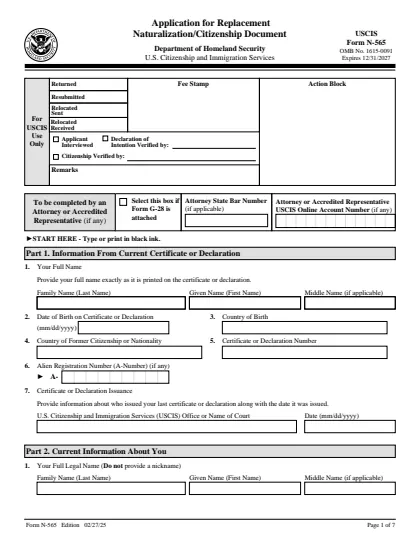
Page 1 16 fields
To Be Completed by an Attorney or Accredited Representative, if any. Select this box if Form G-28 is attached. To Be Completed by an Attorney or Accredited Representative, if any. Enter Attorney State Bar Number, if applicable. To Be Completed by an Attorney or Accredited Representative, if any. Enter Attorney or Accredited Representative U S C I S Online Account Number, if any. Part 1. Information From Current Certificate or Declaration. 1. Your Full Name. Provide your full name exactly as it is printed on the certificate or declaration. Enter Middle Name (if applicable). Part 1. Information From Current Certificate or Declaration. 1. Your Full Name. Provide your full name exactly as it is printed on the certificate or declaration. Enter Given Name (first name). Part 1. Information From Current Certificate or Declaration. 1. Your Full Name. Provide your full name exactly as it is printed on the certificate or declaration. Enter Family Name (last name). Part 1. Information From Current Certificate or Declaration. 4. Enter Country of Former Citizenship or Nationality. Part 1. Information From Current Certificate or Declaration. 6. Enter Alien Registration Number (A Number). Part 1. Information From Current Certificate or Declaration. 5. Enter Certificate or Declaration Number. Part 1. Information From Current Certificate or Declaration. 7. Certificate or Declaration Issuance. Provide information about who issued your last certificate or declaration along with the date it was issued. Enter U.S. Part 1. Information From Current Certificate or Declaration. 7. Certificate or Declaration Issuance. Provide information about who issued your last certificate or declaration along with the date it was issued. Date. Ente Part 2. Current Information About You. 1. Your Full Legal Name (Do not provide a nickname). Enter Middle Name (if applicable). Part 2. Current Information About You. 1. Your Full Legal Name (Do not provide a nickname). Enter Given Name (First Name). Part 2. Current Information About You. 1. Your Full Legal Name (Do not provide a nickname). Enter Family Name (Last Name). Part 1. Information From Current Certificate or Declaration. 2. Date of Birth on Certificate or Declaration. Enter Date as 2-digit Month, 2-digit Day, and 4-digit Year. Part 1. Information From Current Certificate or Declaration. 3. Enter Country of Birth.
Page 2 31 fields
Part 2. Current Information About You. 3. Current Mailing Address. Enter In Care Of Name (if any). Part 2. Current Information About You. 3. Current Mailing Address. Enter Street Number and Name. Part 2. Current Information About You. 3. Current Mailing Address. Select Suite. Part 2. Current Information About You. 3. Current Mailing Address. Select Apartment. Part 2. Current Information About You. 3. Current Mailing Address. Select Floor. Part 2. Current Information About You. 3. Current Mailing Address. If Apartment, Suite or Floor selected enter Number. Part 2. Current Information About You. 3. Current Mailing Address. Enter City or Town. Part 2. Current Information About You. 3. Current Mailing Address. Select State from List of States. AA AE AK AL AP AR AS AZ CA CO CT DC DE FL FM GA GU HI IA ID IL IN KS KY LA MA MD ME MH MI MN MO MP MS MT NC ND NE NH NJ NM NV NY OH OK OR PA PR PW RI SC SD TN TX UT VA VI VT WA WI WV WY Part 2. Current Information About You. 3. Current Mailing Address. Enter Zip Code. Part 2. Current Information About You. 3. Current Mailing Address. Enter Province. Part 2. Current Information About You. 3. Current Mailing Address. Enter Postal Code. Part 2. Current Information About You. 3. Current Mailing Address. Enter Country. Part 2. Current Information About You. 4. Your Current Marital Status. Select Married. Part 2. Current Information About You. 4. Your Current Marital Status. Select Single. Part 2. Current Information About You. 4. Your Current Marital Status. Select Widowed. Part 2. Current Information About You. 4. Your Current Marital Status. Select Divorced. Part 2. Current Information About You. 4. Your Current Marital Status. Select Marriage Annulled. Part 2. Current Information About You. 5. Since becoming a U.S. citizen, have you lost or renounced your U.S. citizenship in any manner? Select No. Part 2. Current Information About You. 5. Since becoming a U.S. citizen, have you lost or renounced your U.S. citizenship in any manner? Select Yes. NOTE: If you answered “Yes” to Item Number 5., provide an explanation i Part 2. Current Information About You. 2. Other Names Used. Line One. Enter Middle Name (if applicable). Part 2. Current Information About You. 2. Other Names Used. Line Two. Enter Family Name (Last Name). Part 2. Current Information About You. 2. Other Names Used. Line Two. Enter Given Name (First Name). Part 2. Current Information About You. 2. Other Names You Have Used. Line Two. Enter Middle Name (if applicable). Part 2. Current Information About You. 2. Other Names Used. Line One. Enter Given Name (First Name). Part 2. Current Information About You. 2. Other Names Used. Provide all other names you have ever used, including aliases, maiden name, and nicknames. If you need extra space to complete this section, use the space provi Part 3. Type of Application. I am applying for a (select only one box). Select: 1. A. New Certificate of Citizenship. Part 3. Type of Application. I am applying for a (select only one box). Select 1. B. New Certificate of Naturalization. Part 3. Type of Application. I am applying for a (select only one box). Select: 1. C. New Certificate of Repatriation. Part 3. Type of Application. I am applying for a (select only one box). Select: 1. D. New Declaration of Intention. Part 3. Type of Application. I am applying for a (select only one box). Select 1. E. Special Certificate of Naturalization to Obtain Recognition of My U.S. Citizenship by a Foreign Country. NOTE: If you selected Item 1.e Part 3. Type of Application. Basis for My Application. Select all applicable boxes and provide explanations where requested. 2. A. Select My certificate or declaration was lost, stolen, or destroyed. NOTE: If you selecte
Page 3 11 fields
Part 3. Type of Application. Basis for My Application. Select all applicable boxes and provide explanations where requested. Select: 2. B. My certificate or declaration is mutilated. NOTE: If you selected Item Number 2.b Part 3. Type of Application. Basis for My Application. Select all applicable boxes and provide explanations where requested. Select: 2. C. My certificate or declaration is incorrect due to a typographical or clerical err Part 3. Type of Application. Basis for My Application. Select all applicable boxes and provide explanations where requested. Select: 2. E. My date of birth has legally changed through a court order or U.S. Government-iss Part 3. Type of Application. Basis for My Application. Select all applicable boxes and provide explanations where requested. Select: 2. G. My reason for applying for a new document is not listed above. NOTE: If you selec Part 3. Type of Application. Basis for My Application. Select all applicable boxes and provide explanations where requested. Select: 2. F. My certificate or declaration is incorrect because my sex listed on the document Part 3. Type of Application. Basis for My Application. Select all applicable boxes and provide explanations where requested. Select: 2. D. My name has legally changed. NOTE: If you selected Item Number 2.d., go to Part 5 Part 4. Complete If Applying to Correct Your Document Due to a U S C I S Typographical or Clerical Error. 2. Enter an explanation of what is incorrect on your current certificate or declaration and attach copies of any d Part 4. Complete If Applying to Correct Your Document Due to a U S C I S Typographical or Clerical Error. NOTE: After completing this section, go to Part 9. 1. What was the typographical or clerical error in your documen Part 4. Complete If Applying to Correct Your Document Due to a U S C I S Typographical or Clerical Error. NOTE: After completing this section, go to Part 9. 1. What was the typographical or clerical e (2) Part 4. Complete If Applying to Correct Your Document Due to a U S C I S Typographical or Clerical Error. NOTE: After completing this section, go to Part 9. 1. What was the typographical or clerical e (3) Part 4. Complete If Applying to Correct Your Document Due to a U S C I S Typographical or Clerical Error. NOTE: After completing this section, go to Part 9. 1. What was the typographical or clerical e (4)
Page 4 13 fields
Part 5. Complete If Applying for a New Document Because of a Name Change. NOTE: After completing this section, go to Part 9. If you are applying to correct your document due to a U S C I S error, use Part 4. My name chan Part 5. Complete If Applying for a New Document Because of a Name Change. NOTE: After completing this section, go to Part 9. If you are applying to correct your document due to a U S C I S error, use (2) Part 6. Complete If Applying for a New Certificate of Citizenship Because of an Official Date of Birth Change. NOTE: After completing this section, go to Part 9. If you are applying to correct your document due to a U S Part 6. Complete If Applying for a New Certificate of Citizenship Because of an Official Date of Birth Change. NOTE: After completing this section, go to Part 4. If you are applying to correct your document due to a U S Part 6. Complete If Applying for a New Certificate of Citizenship Because of an Official Date of Birth Change. 2. My new date of birth is (as shown in the court order or U.S. Government-issued document). New Date of Birt Part 7. Complete If Applying for a New Document Listing Your Sex at Birth. NOTE: After completing this section, go to Part 9. If you are applying to correct your document due to a U S C I S error, use Part 4. 1. My biolo Part 7. Complete If Applying for a New Document Listing Your Sex at Birth. NOTE: After completing this section, go to Part 9. If you are applying to correct your document due to a U S C I S error, use (2) Part 8. Complete If Applying for a Special Certificate of Recognition as a Citizen of the United States to the Government of a Foreign Country. 1. Enter Name of Foreign Country. Part 8. Complete If Applying for a Special Certificate of Recognition as a Citizen of the United States to the Government of a Foreign Country. 2. Information About Foreign Official. Provide the following information abo Part 8. Complete If Applying for a Special Certificate of Recognition as a Citizen of the United States to the Government of a Foreign Country. 2. Information About Foreign Official. Provide the follo (2) Part 8. Complete If Applying for a Special Certificate of Recognition as a Citizen of the United States to the Government of a Foreign Country. 2. Information About Foreign Official. Provide the follo (3) Part 8. Complete If Applying for a Special Certificate of Recognition as a Citizen of the United States to the Government of a Foreign Country. 2. Information About Foreign Official. Provide the follo (4) Part 8. Complete If Applying for a Special Certificate of Recognition as a Citizen of the United States to the Government of a Foreign Country. 2. Information About Foreign Official. Provide the follo (5)
Page 5 16 fields
Part 8. Complete If Applying for a Special Certificate of Recognition as a Citizen of the United States to the Government of a Foreign Country. 3. Foreign Official's Address. Enter City or Town. Part 8. Complete If Applying for a Special Certificate of Recognition as a Citizen of the United States to the Government of a Foreign Country. 3. Foreign Official's Address. Enter Street Number and Name. Part 8. Complete If Applying for a Special Certificate of Recognition as a Citizen of the United States to the Government of a Foreign Country. 3. Foreign Official's Address. Select Suite. Part 8. Complete If Applying for a Special Certificate of Recognition as a Citizen of the United States to the Government of a Foreign Country. 3. Foreign Official's Address. Select Apartment. Part 8. Complete If Applying for a Special Certificate of Recognition as a Citizen of the United States to the Government of a Foreign Country. 3. Foreign Official's Address. Select Floor. Part 8. Complete If Applying for a Special Certificate of Recognition as a Citizen of the United States to the Government of a Foreign Country. 3. Foreign Official's Address. Enter Apartment, Suite or Floor Number. Part 8. Complete If Applying for a Special Certificate of Recognition as a Citizen of the United States to the Government of a Foreign Country. 3. Foreign Official's Address. Select State from List of States. AA AE AK AL AP AR AS AZ CA CO CT DC DE FL FM GA GU HI IA ID IL IN KS KY LA MA MD ME MH MI MN MO MP MS MT NC ND NE NH NJ NM NV NY OH OK OR PA PR PW RI SC SD TN TX UT VA VI VT WA WI WV WY Part 8. Complete If Applying for a Special Certificate of Recognition as a Citizen of the United States to the Government of a Foreign Country. 3. Foreign Official's Address. Enter Zip Code. Part 8. Complete If Applying for a Special Certificate of Recognition as a Citizen of the United States to the Government of a Foreign Country. 3. Foreign Official's Address. Enter Province. Part 8. Complete If Applying for a Special Certificate of Recognition as a Citizen of the United States to the Government of a Foreign Country. 3. Foreign Official's Address. Enter Postal Code. Part 8. Complete If Applying for a Special Certificate of Recognition as a Citizen of the United States to the Government of a Foreign Country. 3. Foreign Official's Address. Enter Country. Part 8. Complete If Applying for a Special Certificate of Recognition as a Citizen of the United States to the Government of a Foreign Country. 4. U S C I S or Consular Official's Certification. Date of Signature. Enter Part 9. Applicant's Contact Information, Certification, and Signature. Applicant's Contact Information. 3. Enter Applicant's Email Address, if any. Part 9. Applicant's Contact Information, Certification, and Signature. Applicant's Contact Information. 1. Enter Applicant's Daytime Telephone Number. Part 9. Applicant's Contact Information, Certification, and Signature. Applicant's Contact Information. 2. Enter Applicant's Mobile Telephone Number, if any. Part 9. Applicant's Contact Information, Certification, and Signature (continued). 4. Applicant's Signature. Date of Signature (m m / d d / y y y y). Enter date as 2-digit Month, 2-digit Day, and 4-digit Year.
Page 6 15 fields
Part 10. Interpreter's Contact Information, Certification, and Signature. Provide the following information about the interpreter. Interpreter's Full Name. 1. Enter Interpreter's Family Name (Last Name). Part 10. Interpreter's Contact Information, Certification, and Signature. Interpreter's Full Name. 1. Enter Interpreter's Given Name (First Name). Part 10. Interpreter's Contact Information, Certification, and Signature. 2. Enter Interpreter's Business or Organization Name, if any. Part 10. Interpreter's Contact Information, Certification, and Signature. Interpreter's Contact Information. 5. Enter Interpreter's Email Address, if any. Part 10. Interpreter's Contact Information, Certification, and Signature. Interpreter's Contact Information. 3. Enter Interpreter's Daytime Telephone Number. Part 10. Interpreter's Contact Information, Certification, and Signature. Interpreter's Contact Information. 4. Enter Interpreter's Mobile Telephone Number, if any. Part 10. Interpreter's Contact Information, Certification, and Signature. Interpreter's Certification. I certify, under penalty of perjury, that I am fluent in English and I have interpreted every question on the applica Part 10. Interpreter's Contact Information, Certification, and Signature. Interpreter's Signature. 7. Date of Signature. Enter date as 2-digit Month, 2-digit Day, and 4-digit Year. Part 11. Contact Information, Declaration, and Signature of the Person Preparing this Application, if Other Than the Applicant. Provide the following information about the preparer. Preparer's Full Name. 1. Enter Prepare Part 11. Contact Information, Declaration, and Signature of the Person Preparing this Application, if Other Than the Applicant. Preparer's Full Name. 1. Enter Preparer's Given Name (First Name). Part 11. Contact Information, Declaration, and Signature of the Person Preparing this Application, if Other Than the Applicant. 2. Enter Preparer's Business or Organization Name, if any. Part 11. Contact Information, Declaration, and Signature of the Person Preparing this Application, if Other Than the Applicant. Preparer's Contact Information. 5. Enter Preparer's Email Address, if any. Part 11. Contact Information, Declaration, and Signature of the Person Preparing this Application, if Other Than the Applicant. Preparer's Contact Information. 4. Enter Preparer's Mobile Telephone Number, if any. Part 11. Contact Information, Declaration, and Signature of the Person Preparing this Application, if Other Than the Applicant. Preparer's Contact Information. 3. Enter Preparer's Daytime Telephone Number. Part 11. Contact Information, Declaration, and Signature of the Person Preparing this Application, if Other Than the Applicant. Preparer's Certification. By my signature, I certify, under penalty of perjury, that I prepa
Page 7 16 fields
Part 12. Additional Information. 3. Enter Page Number. Part 12. Additional Information. 3. Enter Part Number. Part 12. Additional Information. 3. Enter Item Number. Part 12. Additional Information. 3. Enter Additional Information. Part 12. Additional Information. 4. Enter Additional Information. Part 12. Additional Information. 5. Enter Additional Information. Part 12. Additional Information. 6. Enter Additional Information. Part 12. Additional Information. 4. Enter Page Number. Part 12. Additional Information. 4. Enter Part Number. Part 12. Additional Information. 4. Enter Item Number. Part 12. Additional Information. 5. Enter Page Number. Part 12. Additional Information. 5. Enter Part Number. Part 12. Additional Information. 5. Enter Item Number. Part 12. Additional Information. 6. Enter Page Number. Part 12. Additional Information. 6. Enter Part Number. Part 12. Additional Information. 6. Enter Item Number.