Page 1 27 fields
For the year ending December 31. Date. Year 4 digits.
Choose one
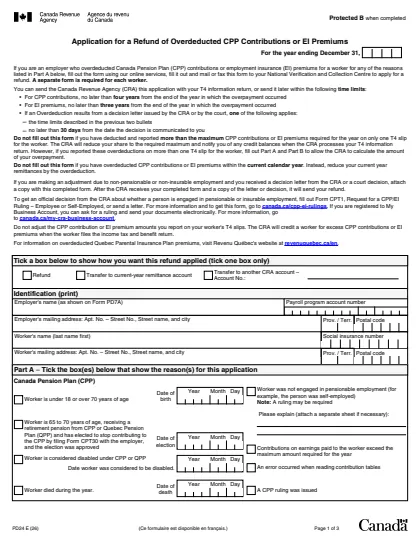
Refund Transfer to current-year remittance account Transfer No Leave blank Canada Revenue Agency account number Identification. Employer's name. As shown on Form PD7A. Identification. First 9 digits of the Payroll program account number. Identification. Last 4 digits of the Payroll program account number. Identification. Employer's mailing address. Apartment Number. Street Number. Street name, and City Identification. Employer. Province or territory. 2 letters. Identification. Employer. Postal code. 6 characters. Identification. Worker's name. Last name first. Identification. Worker. Social insurance number. 9 digits. Identification. Worker's mailing address. Apartment Number. Street Number. Street name, and City Identification. Worker. Province or territory. 2 letters. Identification. Worker. Postal code. 6 characters. Part A. Tick the boxes below that show the reasons for this application. Canada Pension Plan. Worker is under 18 or over 70 years of age Part A. Tick the reason(s) for this application. Canada Pension Plan. Date of birth. Year 4 digits. Month 2 digits. Day 2 digits. Worker is 65 to 70 years of age, receiving a retirement pension from the Canada Pension Plan or the Quebec Pension Plan and has elected to stop contributing to the Canada Pension Plan by filing form CPT30 with the employ Part A. Tick the reason(s) for this application. Canada Pension Plan. Date of election. Year 4 digits. Month 2 digits. Day 2 digits. Worker is considered disabled under the Canada Pension Plan or the Quebec Pension Plan Part A. Tick the reason(s) for this application. Canada Pension Plan. Date worker was considered to be disabled. Year 4 digits. Month 2 digits. Day 2 digits. Worker died during the year Part A. Tick the reason(s) for this application. Canada Pension Plan. Date of death. Year 4 digits. Month 2 digits. Day 2 digits. Part A. Tick the reason(s) for this application. Canada Pension Plan. Worker was not engaged in pensionable employment, for example, the person was self-employed. Note, A ruling may be required Part A. Tick the reason(s) for this application. Canada Pension Plan. Please explain. Attach a separate sheet if necessary. Contributions on earnings paid to the worker exceed the maximum amount required for the year An error occurred when reading contribution tables A CPP ruling was issued
Page 2 29 fields
Part A. Tick the box below that show the reason(s) for this application. Employment Insurance. Premiums on earnings paid to the worker were more than the maximum amount required for the year Worker of a corporation controls a percentage of the voting shares of that corporation. See the next section. Employment Insurance. Percentage of the voting shares of that corporation. Worker was not engaged in insurable employment, for example, the person was self-employed or not dealing at arm's length with their employer. Note: A ruling may be required. Please explain. Attach a separate sheet if necessary. An error occurred when reading premium tables. An EI ruling was issued. Name. Row 1. Title. If an officer of the corporation. Row 1. Number of voting shares owned. Row 1. Date of issue. Date. Year 4 digits. Month 2 digits. Day 2 digits. Row 1. Name. Row 2. Title. If an officer of the corporation. Row 2. Number of voting shares owned. Row 2. Date of issue. Date. Year 4 digits. Month 2 digits. Day 2 digits. Row 2. Name. Row 3. Title. If an officer of the corporation. Row 3. Number of voting shares owned. Row 3. Date of issue. Date. Year 4 digits. Month 2 digits. Day 2 digits. Row 3.
Choose one
Yes Yes Leave blank Date. Year 4 digits. Month 2 digits. Day 2 digits. Row 1. Transferred to. Row 1. Transferred from. Row 1. Date. Year 4 digits. Month 2 digits. Day 2 digits. Row 2. Transferred to. Row 2. Transferred from. Row 2. Date. Year 4 digits. Month 2 digits. Day 2 digits. Row 3. Transferred to. Row 3. Transferred from. Row 3.
Page 3 174 fields
Pay period or year. From date. Year 4 digits. Month 2 digits. Day 2 digits. Row 1. Pay Period or Year. To date. Year 4 digits. Month 2 digits. Day 2 digits. Row 1. Canada Pension Plan. Pensionable earnings. Row 1. Canada Pension Plan. Worker Canada Pension Plan contribution deducted. Row 1. Canada Pension Plan. Required Canada pension plan contribution. Row 1. Canada Pension Plan. Canada pension plan overpayment. Row 1. Second additional Canada pension plan contribution. Worker second Canada pension plan contribution deducted. Row 1. Second additional Canada pension plan contribution. Required second Canada pension plan contribution. Row 1. Second additional Canada pension plan contribution. Second Canada pension plan overpayment. Row 1. Employment Insurance. Insurable earnings. Row 1. Employment Insurance. Worker employment insurance premium deducted. Row 1. Employment Insurance. Required employment insurance premium. Row 1. Employment Insurance. Employment insurance overpayment. Row 1. Pay Period or Year. From date. Year 4 digits. Month 2 digits. Day 2 digits. Row 2. Pay Period or Year. To date. Year 4 digits. Month 2 digits. Day 2 digits. Row 2. Canada Pension Plan. Pensionable earnings. Row 2. Canada Pension Plan. Worker Canada Pension Plan contribution deducted. Row 2. Canada Pension Plan. Required Canada pension plan contribution. Row 2. Canada Pension Plan. Canada pension plan overpayment. Row 2. Second additional Canada pension plan contribution. Worker second Canada pension plan contribution deducted. Row 2. Second additional Canada pension plan contribution. Required second Canada pension plan contribution. Row 2. Second additional Canada pension plan contribution. Second Canada pension plan overpayment. Row 2. Employment Insurance. Insurable earnings. Row 2. Employment Insurance. Worker employment insurance premium deducted. Row 2. Employment Insurance. Required employment insurance premium. Row 2. Employment Insurance. Employment insurance overpayment. Row 2. Pay Period or Year. From date. Year 4 digits. Month 2 digits. Day 2 digits. Row 3. Pay Period or Year. To date. Year 4 digits. Month 2 digits. Day 2 digits. Row 3. Canada Pension Plan. Pensionable earnings. Row 3. Canada Pension Plan. Worker Canada Pension Plan contribution deducted. Row 3. Canada Pension Plan. Required Canada pension plan contribution. Row 3. Canada Pension Plan. Canada pension plan overpayment. Row 3. Second additional Canada pension plan contribution. Worker second Canada pension plan contribution deducted. Row 3. Second additional Canada pension plan contribution. Required second Canada pension plan contribution. Row 3. Second additional Canada pension plan contribution. Second Canada pension plan overpayment. Row 3. Employment Insurance. Insurable earnings. Row 3. Employment Insurance. Worker employment insurance premium deducted. Row 3. Employment Insurance. Required employment insurance premium. Row 3. Employment Insurance. Employment insurance overpayment. Row 3. Pay Period or Year. From date. Year 4 digits. Month 2 digits. Day 2 digits. Row 4. Pay Period or Year. To date. Year 4 digits. Month 2 digits. Day 2 digits. Row 4. Canada Pension Plan. Pensionable earnings. Row 4. Canada Pension Plan. Worker Canada Pension Plan contribution deducted. Row 4. Canada Pension Plan. Required Canada pension plan contribution. Row 4. Canada Pension Plan. Canada pension plan overpayment. Row 4. Second additional Canada pension plan contribution. Worker second Canada pension plan contribution deducted. Row 4. Second additional Canada pension plan contribution. Required second Canada pension plan contribution. Row 4. Second additional Canada pension plan contribution. Second Canada pension plan overpayment. Row 4. Employment Insurance. Insurable earnings. Row 4. Employment Insurance. Worker employment insurance premium deducted. Row 4. Employment Insurance. Required employment insurance premium. Row 4. Employment Insurance. Employment insurance overpayment. Row 4. Pay Period or Year. From date. Year 4 digits. Month 2 digits. Day 2 digits. Row 5. Pay Period or Year. To date. Year 4 digits. Month 2 digits. Day 2 digits. Row 5. Canada Pension Plan. Pensionable earnings. Row 5. Canada Pension Plan. Worker Canada Pension Plan contribution deducted. Row 5. Canada Pension Plan. Required Canada pension plan contribution. Row 5. Canada Pension Plan. Canada pension plan overpayment. Row 5. Second additional Canada pension plan contribution. Worker second Canada Pension Plan contribution deducted. Row 5. Second additional Canada pension plan contribution. Required second Canada pension plan contribution. Row 5. Second additional Canada pension plan contribution. Second Canada pension plan overpayment. Row 5. Employment Insurance. Insurable earnings. Row 5. Employment Insurance. Worker employment insurance premium deducted. Row 5. Employment Insurance. Required employment insurance premium. Row 5. Employment Insurance. Employment insurance overpayment. Row 5. Pay Period or Year. From date. Year 4 digits. Month 2 digits. Day 2 digits. Row 6. Pay Period or Year. To date. Year 4 digits. Month 2 digits. Day 2 digits. Row 6. Canada Pension Plan. Pensionable earnings. Row 6. Canada Pension Plan. Worker Canada Pension Plan contribution deducted. Row 6. Canada Pension Plan. Required Canada pension plan contribution. Row 6. Canada Pension Plan. Canada pension plan overpayment. Row 6. Second additional Canada pension plan contribution. Worker second Canada Pension Plan contribution deducted. Row 6. Second additional Canada pension plan contribution. Required second Canada pension plan contribution. Row 6. Second additional Canada pension plan contribution. Second Canada pension plan overpayment. Row 6. Employment Insurance. Insurable earnings. Row 6. Employment Insurance. Worker employment insurance premium deducted. Row 6. Employment Insurance. Required employment insurance premium. Row 6. Employment Insurance. Employment insurance overpayment. Row 6. Pay Period or Year. From date. Year 4 digits. Month 2 digits. Day 2 digits. Row 7. Pay Period or Year. To date. Year 4 digits. Month 2 digits. Day 2 digits. Row 7. Canada Pension Plan. Pensionable earnings. Row 7. Canada Pension Plan. Worker Canada Pension Plan contribution deducted. Row 7. Canada Pension Plan. Required Canada pension plan contribution. Row 7. Canada Pension Plan. Canada pension plan overpayment. Row 7. Second additional Canada pension plan contribution. Worker second Canada pension plan contribution deducted. Row 7. Second additional Canada pension plan contribution. Required second Canada pension plan contribution. Row 7. Second additional Canada pension plan contribution. Second Canada pension plan overpayment. Row 7. Employment Insurance. Insurable earnings. Row 7. Employment Insurance. Worker employment insurance premium deducted. Row 7. Employment Insurance. Required employment insurance premium. Row 7. Employment Insurance. Employment insurance overpayment. Row 7. Pay Period or Year. From date. Year 4 digits. Month 2 digits. Day 2 digits. Row 8. Pay Period or Year. To date. Year 4 digits. Month 2 digits. Day 2 digits. Row 8. Canada Pension Plan. Pensionable earnings. Row 8. Canada Pension Plan. Worker Canada Pension Plan contribution deducted. Row 8. Canada Pension Plan. Required Canada pension plan contribution. Row 8. Canada Pension Plan. Canada pension plan overpayment. Row 8. Second additional Canada pension plan contribution. Worker second Canada Pension Plan contribution deducted. Row 8. Second additional Canada pension plan contribution. Required second Canada pension plan contribution. Row 8. Second additional Canada pension plan contribution. Second Canada pension plan overpayment. Row 8. Employment Insurance. Insurable earnings. Row 8. Part B. Employment Insurance. Worker employment insurance premium deducted. Row 8. Employment Insurance. Required employment insurance premium. Row 8. Employment Insurance. Employment insurance overpayment. Row 8. Pay Period or Year. From date. Year 4 digits. Month 2 digits. Day 2 digits. Row 9. Pay Period or Year. To date. Year 4 digits. Month 2 digits. Day 2 digits. Row 9. Canada Pension Plan. Pensionable earnings. Row 9. Canada Pension Plan. Worker Canada Pension Plan contribution deducted. Row 9. Canada Pension Plan. Required Canada pension plan contribution. Row 9. Canada Pension Plan. Canada pension plan overpayment. Row 9. Second additional Canada pension plan contribution. Worker second Canada pension plan contribution deducted. Row 9. Second additional Canada pension plan contribution. Required second Canada pension plan contribution. Row 9. Second additional Canada pension plan contribution. Second Canada pension plan overpayment. Row 9. Employment Insurance. Insurable earnings. Row 9. Employment Insurance. Worker employment insurance premium deducted. Row 9. Employment Insurance. Required employment insurance premium. Row 9. Employment Insurance. Employment insurance overpayment. Row 9. Pay Period or Year. From date. Year 4 digits. Month 2 digits. Day 2 digits. Row 10. Pay Period or Year. To date. Year 4 digits. Month 2 digits. Day 2 digits. Row 10. Canada Pension Plan. Pensionable earnings. Row 10. Canada Pension Plan. Worker Canada Pension Plan contribution deducted. Row 10. Canada Pension Plan. Required Canada pension plan contribution. Row 10. Canada Pension Plan. Canada pension plan overpayment. Row 10. Second additional Canada pension plan contribution. Worker second Canada pension plan contribution deducted. Row 10. Second additional Canada pension plan contribution. Required second Canada pension plan contribution. Row 10. Second additional Canada pension plan contribution. Second Canada pension plan overpayment. Row 10. Employment Insurance. Insurable earnings. Row 10. Employment Insurance. Worker employment insurance premium deducted. Row 10. Employment Insurance. Required employment insurance premium. Row 10. Employment Insurance. Employment insurance overpayment. Row 10. Pay Period or Year. From date. Year 4 digits. Month 2 digits. Day 2 digits. Row 11. Pay Period or Year. To date. Year 4 digits. Month 2 digits. Day 2 digits. Row 11. Canada Pension Plan. Pensionable earnings. Row 11. Canada Pension Plan. Worker Canada Pension Plan contribution deducted. Row 11. Canada Pension Plan. Required Canada pension plan contribution. Row 11. Canada Pension Plan. Canada pension plan overpayment. Row 11. Second additional Canada pension plan contribution. Worker second Canada pension plan contribution deducted. Row 11. Second additional Canada pension plan contribution. Required second Canada pension plan contribution. Row 11. Second additional Canada pension plan contribution. Second Canada pension plan overpayment. Row 11. Employment Insurance. Insurable earnings. Row 11. Employment Insurance. Worker employment insurance premium deducted. Row 11. Employment Insurance. Required employment insurance premium. Row 11. Employment Insurance. Employment insurance overpayment. Row 11. Pay Period or Year. From date. Year 4 digits. Month 2 digits. Day 2 digits. Row 12. Pay Period or Year. To date. Year 4 digits. Month 2 digits. Day 2 digits. Row 12. Canada Pension Plan. Pensionable earnings. Row 12. Canada Pension Plan. Worker Canada Pension Plan contribution deducted. Row 12. Canada Pension Plan. Required Canada pension plan contribution. Row 12. Canada Pension Plan. Canada pension plan overpayment. Row 12. Second additional Canada pension plan contribution. Worker second Canada pension plan contribution deducted. Row 12. Second additional Canada pension plan contribution. Required second Canada pension plan contribution. Row 12. Second additional Canada pension plan contribution. Second Canada pension plan overpayment. Row 12. Employment Insurance. Insurable earnings. Row 12. Employment Insurance. Worker employment insurance premium deducted. Row 12. Employment Insurance. Required employment insurance premium. Row 12. Employment Insurance. Employment insurance overpayment. Row 12. Total. Canada Pension Plan. Worker Canada Pension Plan contribution deducted. Total. Canada Pension Plan. Required Canada pension plan contribution. Total. Canada Pension Plan. Canada pension plan overpayment. Part B. Employer Canada pension plan overpayment. Total. Second additional Canada pension plan contribution. Worker second Canada pension plan contribution deducted. Total. Second additional Canada pension plan contribution. Required second Canada pension plan contribution. Total. Second additional Canada pension plan contribution. Second Canada pension plan overpayment. Part B. Employer second additional Canada pension plan overpayment. Total. Employment Insurance. Worker employment insurance premium deducted. Total. Employment Insurance. Required employment insurance premium. Total. Employment Insurance. Employment insurance overpayment. Part B. Employer Employment Insurance Overpayment. Percentage. Part B. Employer employment insurance overpayment. Part B. Total overpayment. Certification. Name. Certification Date. Year 4 digits. Month 2 digits. Day 2 digits. Certification. Position or office. Certification. Telephone number. 10 digits.